 Reckless Technology
Reckless Pedalboard
v0.21A board for the other twenty Reckless plugins: chain them in any order, split the signal into two lanes and join it again, and switch each pedal with its footswitch. Your host sees one plugin.

From the user guide
Building a board
Signal enters at IN on the left and leaves at OUT on the right. A fresh insert starts empty; a saved session brings the board back whole.

- Add: click a socket (a dashed circle with a plus) and choose a pedal. Up to sixteen pedals; the same plugin can go on more than once.
- Play: each pedal is a miniature of its panel with its two most-used knobs at working size, an LED lit while it is in, and a footswitch that fades it in or out over 20 ms.
- Move: drag a pedal to any gap. Drop it on another pedal (REPLACE) to take its place, or off the top or bottom of the board (REMOVE) to delete it.
- Right click a pedal for Open, Replace with and Remove.
- Open: double click a pedal for its whole panel in a drawer, with CLOSE on the rail above it and the pedal’s footswitch, large, centred below it. The panel grows out of the pedal as it opens and shrinks back into it as it closes. The level strip and tuner stay in view.

A long board wraps onto a second tier. Adding, moving or removing a pedal dips the sound for 5 ms, so rewire between takes; footswitches and knobs never dip.
Splitting and merging
Choose Split from a socket to place a splitter and a merger with two lanes, A above B. The splitter’s plate sets the mode: L / R (lane A the left channel, lane B the right), Parallel (both lanes the whole signal, summed at half each) or M / S (the middle and the sides). The merger has a level and a PAN per lane. The shorter lane is delayed to match the longer one. Right click the splitter or merger to remove the split; its pedals return to the chain.

Macros, MIDI and keys
Macros. The host cannot see the pedals’ knobs, so right click a knob and assign it to one of eight macros, or to the Inverted list to run it the other way, then automate the macro. The macro strip under the board names each macro’s knobs; right click a macro there to invert or remove a link.

MIDI. Every Wah on the board hears the board’s MIDI, so it follows an expression pedal on CC 1.
Keys. A Gate, Comp, Vocoder, Amp, NAM or Wah wears a KEY jack. Drag a cable from it to a pedal upstream, to IN, or to SC (the board’s sidechain input), or click the jack and choose under Key from. The board sets the pedal’s key switch for you. A key must come from upstream, or from the other lane of the same split.

The tuner
The tuner sits in the level strip and listens at IN. It shows the nearest note, the frequency, the cents off (amber within three), and a strobe that drifts right when sharp, left when flat. It starts off: its own footswitch, at the foot of the column beside it, switches it on and off. AUTO MUTE, at the column’s top and on by default, silences the board while the tuner is on, as a tuner pedal does, so you can tune quietly mid-set; type the pitch for A into REFERENCE, under it. The chevron bar under the strip folds the strip away.

Presets and starting again
A board preset is the whole rig: every pedal with its settings, the splits, keys, macro links and the board’s own controls. Each pedal’s drawer also has its plugin’s own PRESETS plate.
The PRESETS menu opens with two fresh starts: New empty board, every setting back, and New board: Amp, Cab, Space. Both take the pedals off, so they ask first unless a saved preset keeps them.
Controls
The first four rows are what the host sees.
| Close-up | Control | Range | Default | What it does |
|---|---|---|---|---|
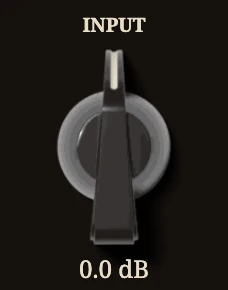 | Input | -12 to +12 dB | 0 dB | Gain ahead of the first pedal; the IN meter reads after it. |
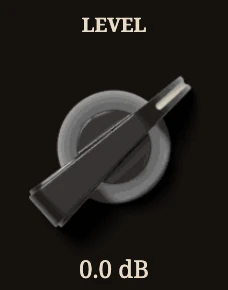 | Level | -24 to +12 dB | 0 dB | Output level after the last pedal; the OUT meter reads it. |
 | Footswitch 1 to 16 | on / off | on | Each pedal’s footswitch, numbered along the signal path. |
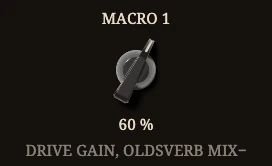 | Macro 1 to 8 | 0 to 100 % | 0 % | Drives its assigned pedal knobs over their whole range. |
 | REFERENCE | 430 to 450 Hz | 440 Hz | The tuner’s pitch for A; click and type. |
 | AUTO MUTE | on / off | on | Mutes the board’s output while the tuner is on. |
 | Tuner footswitch | on / off | off | Switches the tuner on or off; its LED lights while on. |
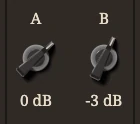 | Merger level | -24 to +12 dB | 0 dB | Each lane’s level into the merger. |
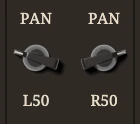 | PAN | L100 to R100 | L / R: hard left and right; else centre | Places each lane in the stereo field. |
Tips
- The whole amp is Amp, then Cab, then Space, as New board lays it down; add a Gate in front for hum.
- The board reports its chain’s latency and tells the host when it changes.
- In an L / R or M / S lane a stereo effect is heard in mono.