 Reckless Technology
Reckless Polysynth
v1.4.0A polyphonic virtual-analog synthesiser, the first instrument in the Reckless series: three oscillators that can each be a stack of detuned copies, two filters, four envelopes, three LFOs, an eight-slot modulation matrix and four of the Reckless effects, for Windows, macOS and Linux.
It is a polyphonic synthesiser in the classic subtractive style, laid out so that you can see everything it is doing. Each oscillator can be a single clean wave or a stack of up to eight detuned copies fanned across the stereo field. Behind them sit a noise source, two filters of different characters, four envelopes, three LFOs and a modulation matrix of eight slots, and after the voices come four of the Reckless effects, the real ones, in an order you arrange by dragging. It plays up to 32 notes at once, and it comes as a VST3 and a standalone app on Windows, macOS and Linux, and an Audio Unit on a Mac.
It is not part of the plugin suite’s download; it installs on its own, and it makes sound only when it is played, so open it with a keyboard to hand, or use the on-screen one.
Hear it first
Forty-one of the 66 factory presets, chosen by ear and played in turn, with the panel moving as it plays: 6 minutes 20 seconds of what the instrument does in its stock setups, from basses and keys through leads and pads to the stranger effects. Each sound’s tail rings on under the next, and the arpeggiators come last. It is a tour rather than a trailer, so it is long; dip into it anywhere. And treat it as a tour of the ground, not of the destination, for the reason the next section gives.

The player loads from YouTube only when you press play.
Download
Free, for any use, on as many computers as you like, for Windows, macOS and Linux. It is not part of the plugin suite’s download and installs on its own.
Not about presets
The Polysynth was inspired by the synthesisers of the 1970s, and presets are not really what it is about. It is about experimenting and discovering your own tones in there.
Those instruments were not browsed. You sat in front of a panel of knobs and switches, with nothing stored, and you made the sound you could hear in your head, or the one you did not know you wanted until it happened. A patch was something you found, and the finding was the point. I have tried to keep that. The whole instrument is on eight pages you can see, and every control is there to be turned.
It does come with 66 factory presets, in six families, and they are worth loading for what they teach: open one, play it, and look at how it is made. But they are starting points and not the destination. Take one apart. Turn the oscillators up one at a time, bring the filter down, put a matrix row on something it was not meant to move. The sound that is yours is the one you find by turning things, not the one you load.
What it is made of
The Polysynth is subtractive, as the instruments that inspired it were: start with a sound rich in harmonics, then carve it away. Three kinds of part do the work. Sources of sound are the oscillators and the noise. Shapers of sound are the filters and the amplifier. Movers are the envelopes, the LFOs and the modulation matrix, which change the shapers while a note plays. Every note you play is given a voice of its own, all built the same way, and the voices are added together and sent through the effects.
The parts
- Oscillators
- Three. Each plays a saw, a pulse, a triangle or a sine, as one to eight copies tuned slightly apart (up to 20 cents) and fanned across the stereo field, so a voice is stereo from the oscillators on. A control called Duty reshapes any wave. Oscillator 3 is also the carrier for cross-modulation, where oscillator 1 or 2 bends its pitch at audio speed. The waves are read from band-limited tables, so even the highest notes hold nothing but harmonics below 20 kHz. Cross-modulation is the one place the sound is bent past what the tables hold, so its index is capped, and the cap narrows higher up the keyboard, to keep its sidebands under 20 kHz.
- Noise
- White noise, in the centre of the stereo field, with a level knob.
- Mixer
- The level of each oscillator and of the noise, and a stereo-width control for how far the copies are fanned.
- Filters (the VCF)
- Two, which can be in series or in parallel. Filter 1 is a four-pole ladder lowpass, cutting 24 dB an octave, with a resonance that runs up to self-oscillation. Filter 2 is a different kind: a 12 dB filter that can be a lowpass, a bandpass or a highpass. In analog days this part was a voltage-controlled filter, a VCF, and the name has stuck.
- Amplifier (the VCA)
- Sets the loudness of each voice, from envelope 1 and the velocity of the key. The voltage-controlled amplifier, in the old terms.
- Envelope generators
- Four, each with an attack, a decay, a sustain and a release. The first shapes the amplifier and the second the filters. The third and fourth do nothing by themselves: they are shapes for the matrix to send wherever you like.
- Modifiers: the LFOs and the matrix
- Three LFOs, always locked to the host’s tempo and running from a note length of two bars down to a thirty-second. LFO 1 is the vibrato, and the mod wheel brings it in; LFO 2 sweeps filter 1’s cutoff, in octaves; LFO 3 is a free one for the matrix. The modulation matrix has eight slots. Each takes a source, a destination, a depth and an optional second source, a via, which scales the first.
- Arpeggiator and step lane
- Above the voices, and off until you switch it on. The arpeggiator takes the keys you hold and plays them in turn, in one of six orders over one to four octaves, at a note length locked to the host’s tempo. Beside it is a lane of sixteen steps, each a value from 0 to 1 with a bottom that is a rest. The lane is a source in the matrix like the LFOs are, and it runs whether or not the arpeggiator is playing notes.
- Effects
- Four of the Reckless effects, hosted whole: the real Mod, Drive, Delay and Oldsverb plugins, not imitations, running after the voices are added together. Each can be switched in or out, and they run in an order you set by dragging, which a preset remembers. After them come the master volume and an output limiter.
- Voices
- Up to 32. A new note takes its own voice if it is already sounding, then a free one, then the quietest voice that has been let go, and only when every key is held down the oldest.
The signal flow
This is the path of the sound, from the oscillators to the output, with the things that move it drawn apart.
The modulation matrix
The envelopes and the LFOs above act directly on the things they are named for. Everything else is the matrix’s job: any source on the left can be sent to any destination on the right, up to eight times at once.
The controls, group by group
The panel is taken here one page at a time, in its own order. For each group of controls it says what the group is for before what each control does, and then where the idea came from, because most of these controls are older than the software they are in, and a few are not.
A fresh Polysynth is deliberately plain: one sawtooth through a lowpass filter at 2 kHz, with every effect off and nothing modulating anything. Everything else is for you to bring in, one control at a time, and hear what it did.
Three things are worth knowing before you start, because they are what make this instrument feel as it does.
- Every oscillator can be a stack. Each of the three plays from one to eight copies of its waveform, spread evenly in pitch about the note, and fans them across the stereo field. One copy is a plain oscillator; seven detuned sawtooths are the big, wide sound of a classic string synth.
- The LFOs are locked to the tempo. The three have no speed in hertz: each runs at a note length from two bars down to a thirty-second. There is no free rate.
- The matrix adds, and never takes away. The knobs are where the sound rests. The eight matrix slots say how far a source pulls it from there, so a row can push a control further but can never undo what its own knob says.
The window is a sidebar of eight pages, and the next eight sections follow them in order: OSC 1+2, OSC 3, FILTER, ENVELOPES, LFO, EFFECTS, MATRIX and ARP. The window never changes size as you move between them, and a strip down the right, the same on every page, holds the volume fader and the level meters.
The window around the pages
Across the top is the header: the title, a small scope showing the last few milliseconds of the output, a VOICES readout (3 / 24 means three notes sounding with 24 oscillator copies between them), a MIDI lamp that lights whenever any MIDI message arrives, and the KEYS, PRESETS and settings buttons. Under the pages is a five-octave on-screen keyboard, C2 to C7, which plays notes when you click it; it is for trying a sound, since every click is at the same velocity.
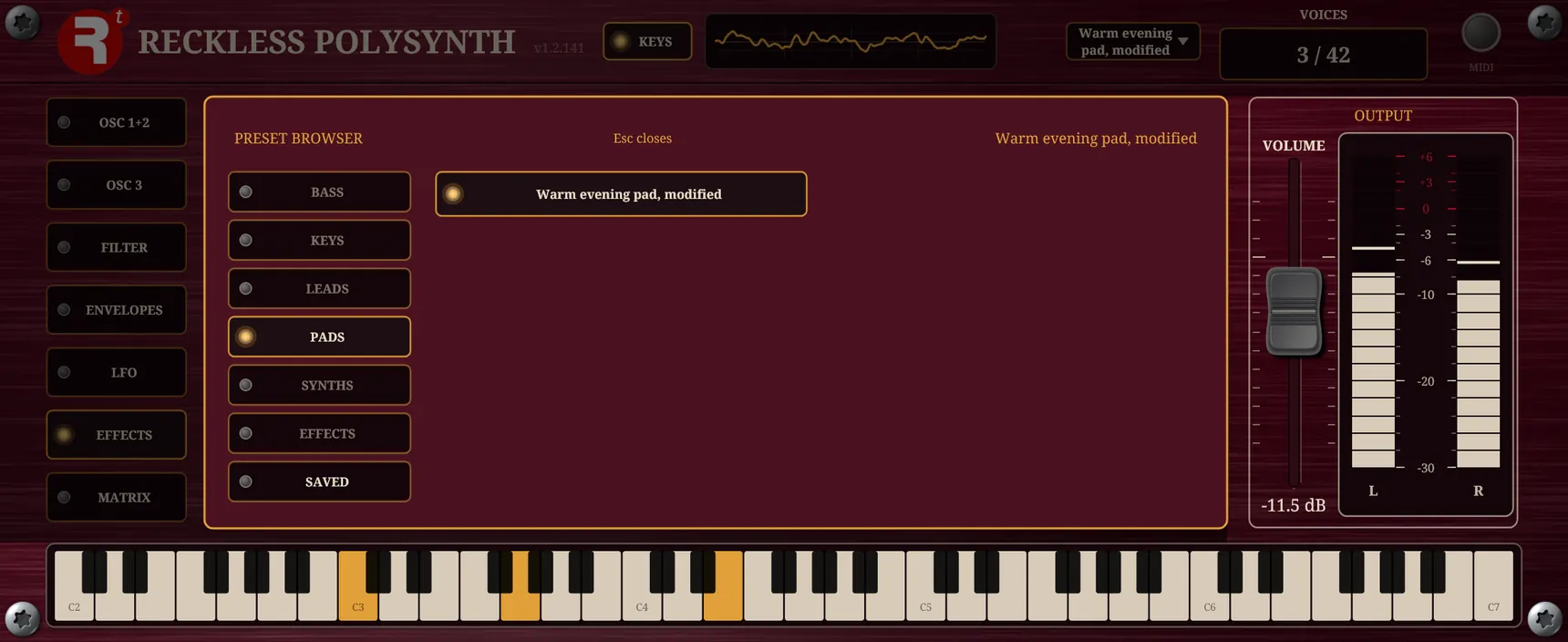
A knob turns by dragging it; double-click puts it back to its default and a click on its box lets you type a value. Where a control has nothing to do at its lowest setting its box reads Off. A dimmed knob is one your present settings leave with nothing to act on; it keeps its value, and its tooltip says what to change to bring it back.
The VOLUME fader at the right runs from −40 to +12 dB and rests at −6 dB, with left and right meters read after the limiter.
OSC 1+2
The oscillators are where every sound begins: they make the raw material that everything after them shapes. The first page holds the first two oscillators and the mix. The three oscillators have the same seven controls: OSC 1 and OSC 2 share this page and OSC 3 has the next. OSC 1 starts at full level; OSC 2 and OSC 3 start at nothing, so they are not in the sound until you raise their LEVEL.
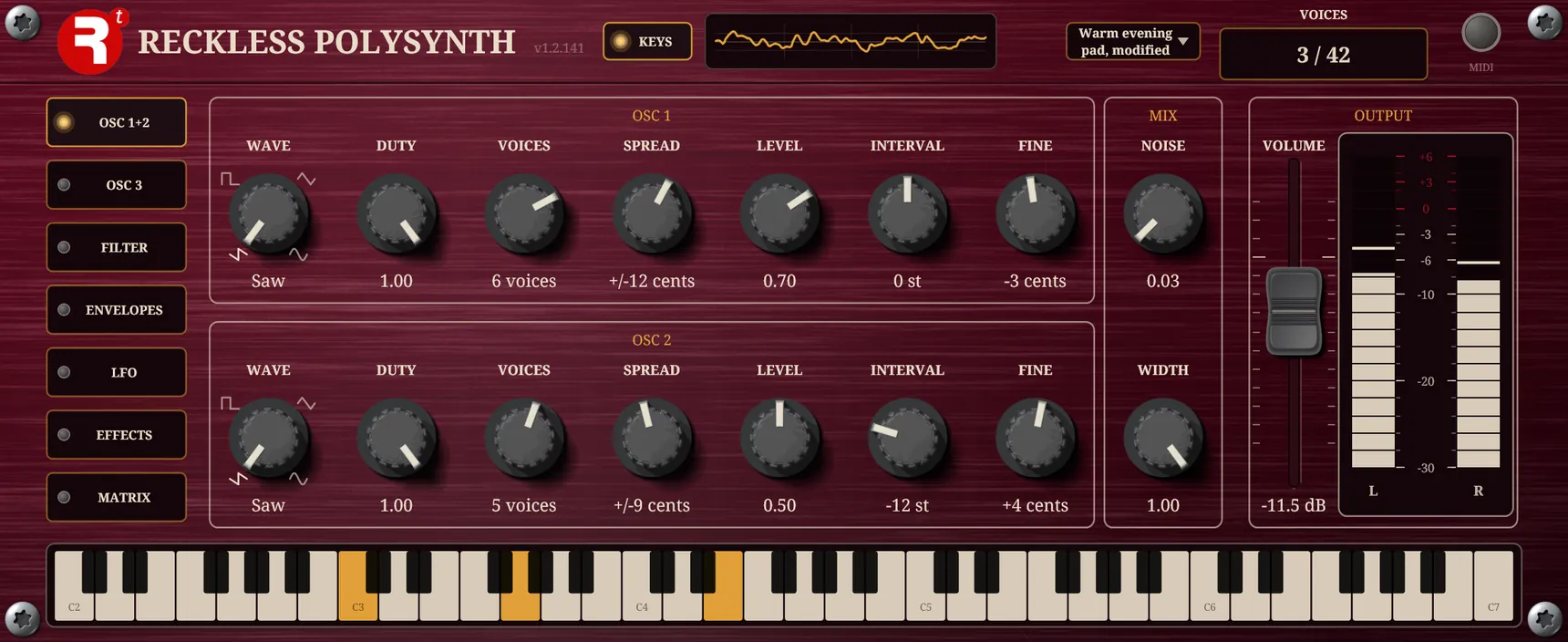
| Control | Range | Default | What it does |
|---|---|---|---|
| WAVE | Saw, Pulse, Triangle, Sine | Saw | The shape the oscillator plays. It is a rotary switch with a picture of each shape round the dial. |
| DUTY | 0 to 1 | 1 | A second shape for every waveform, below. Dimmed on a Sine, which ignores it. |
| VOICES | 1 to 8 | 1 | Copies of the waveform played together. One is a plain oscillator; seven saws are the big detuned stack. |
| SPREAD | 0 to 20 cents | 8 cents | How far apart the copies are detuned. They are spread evenly about the note, so a wider spread thickens it without moving its pitch. Dimmed with one voice, which has nothing to spread. |
| LEVEL | 0 to 1 | 1, 0, 0 | How much of this oscillator reaches the filter. At 0 it is out of the sound. |
| INTERVAL | −24 to +24 semitones | 0 | Shifts this oscillator from the note in whole semitones: 12 is an octave, 7 a fifth. |
| FINE | −50 to +50 cents | 0 | Tunes this oscillator finely. Detune two oscillators against each other for a slow beating. |
DUTY gives every waveform a second shape, and what it does depends on the waveform. At the top of the knob every waveform is plain. Lower it and a Saw falls across only the first part of its cycle and then rests flat; a Triangle squares off towards a trapezoid; a Pulse narrows from a square to a thin pulse. The reshaped waves stay as clean across the keyboard as the plain ones. DUTY is a good thing to modulate: a pulse whose width moves is the classic animated sound.
Where it comes from
The four waves are the ones the first analog synthesisers settled on, because each is cheap to make and each has its own recipe of harmonics: a sawtooth has all of them, a square only the odd ones, a triangle the odd ones much more faintly, and a sine just the one. Subtractive synthesis starts with a wave rich in harmonics, like the saw, and carves it down.
The stack is part old and part new. Tuning two or three oscillators a few cents apart for a thicker note is old: the Minimoog of 1970 had three oscillators to a voice, and the Prophet-5 of 1978 gave each of its voices two. What is not from the 1970s is the stack as a waveform in its own right. That came with Roland’s JP-8000 in 1996, which put a stack of detuned sawtooths behind a single “super saw” choice, and its huge, bright, wide sound is the supersaw of trance and dance music since. VOICES and SPREAD are that later idea, built on the earlier trick of detuning by ear; they are here because the sound is a good one, not because it is old.
DUTY is the old pulse-width control. Narrow a pulse and its harmonics change, and if the width is swept slowly by an LFO or an envelope the result sounds something like two oscillators slowly drifting in and out of tune. That made pulse-width modulation a staple of 1970s analog synthesisers: the cheapest way to make a single oscillator sound alive. Here every wave has a duty, not only the pulse, and it is a matrix destination, so anything can sweep it.
Beside the oscillators is the MIX box. NOISE adds hiss (0 to 1, nothing to begin with) for breath, wind and percussion, and WIDTH (0 to 1, full to begin with) sets how far the detuned copies fan across the stereo field. Nothing in the voice is mono, but the noise is always in the middle. WIDTH needs copies and some spread to have anything to fan, and is dimmed until one oscillator has both.
Where it comes from
A noise source was a standard part of analog synthesisers: it has no pitch, so it is what you reach for to make breath, wind, hiss and the start of a drum or a cymbal. On this panel it is a single knob, mixed in before the filter so that the filter shapes it like everything else.
OSC 3
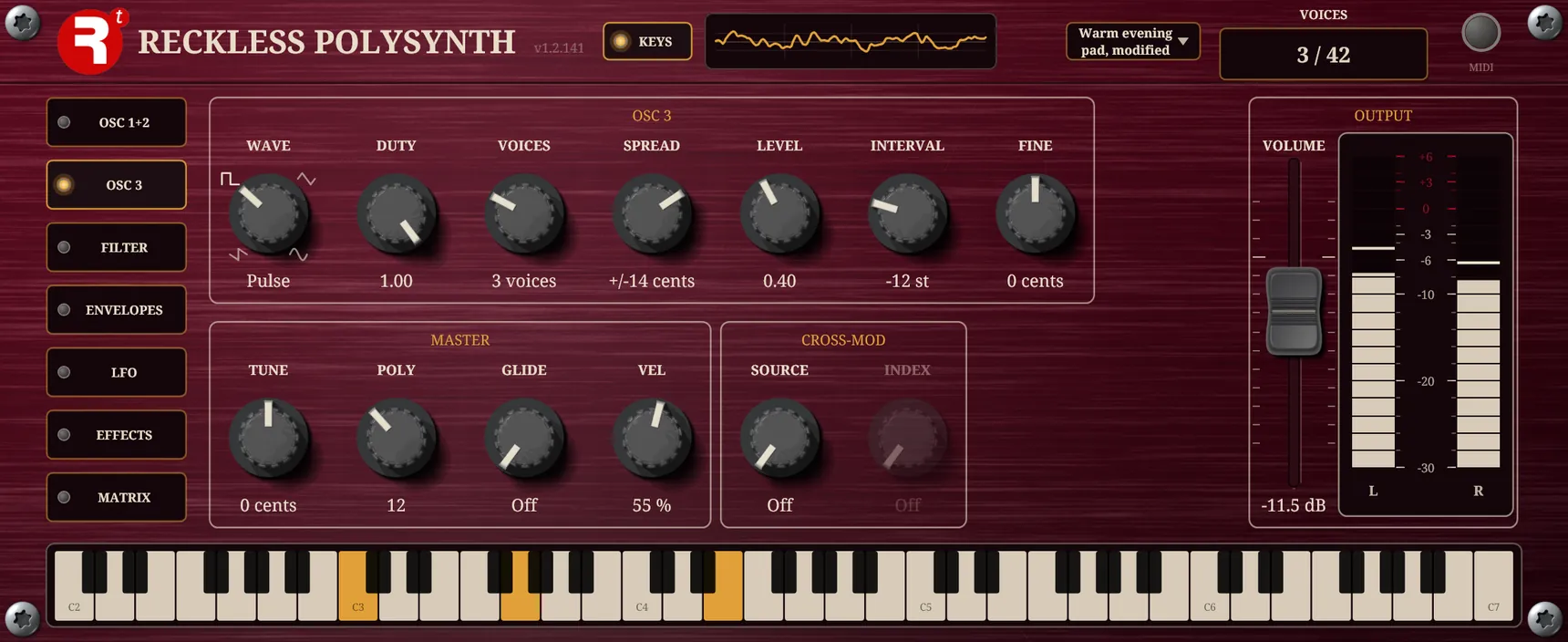
The second page holds the third oscillator, with the seven controls above, and two boxes of its own.
Master
The instrument-wide controls: TUNE (the whole pitch, −100 to +100 cents), POLY (1 to 32 notes, 16 to begin with; 1 plays a single line, and past the limit the quietest released note is taken for the new one, or the oldest when every note is held), GLIDE (the time a note takes to slide from the one before, 5 ms to 5 s; below 5 ms it reads Off and each note jumps) and VEL (how far the speed of a key sets the loudness: 100 % is fully, lower flattens it, and 0 reads Organ, where every note plays at one level however it is struck).
Where it comes from
Polyphony. The Minimoog of 1970 played one note at a time. Polyphonic synthesisers followed during the 1970s, and Sequential’s Prophet-5 of 1978 is widely regarded as the first polyphonic synthesiser that could store its own sounds. Its five voices were a great deal for the time; 32 is a convenience of a modern computer. That memory is where the preset begins, which is a little ironic on a page that begins by saying this instrument is not about presets.
Glide. Portamento is Italian for “carrying”: the slide from one note to the next that a singer or a violinist makes without thinking. Analog synthesisers made it by smoothing the keyboard’s control voltage so that the pitch lags towards the new note, and GLIDE does the same thing in a different way: a voice slides from the pitch it was playing, exponentially, and then arrives exactly. It is on the panel because a synth is the one keyboard instrument that can move between notes.
Cross-modulation
The CROSS-MOD box lets one oscillator bend another’s pitch at audio speed, which is how bells, metallic tones and electric-piano tines are made. OSC 3 is the carrier, the one you hear; SOURCE picks the modulator, OSC 1 or OSC 2 (Off to begin with); INDEX (0 to 10 radians) says how hard the modulator bends it. At 0 the carrier is plain.
It works with a sine on a sine only: the carrier and the modulator must both have WAVE on Sine, and OSC 3 must be sounding, or INDEX is dimmed. A bright wave bent at audio speed throws out more harmonics than any note can hold cleanly, so the Polysynth does not offer it. INDEX also narrows as you play higher up the keyboard, so the setting stays clean everywhere; the same setting bends a low note more than a high one. The modulator is heard only if its own LEVEL is up, so for a pure bell, leave it at 0: it still does its work.
Where it comes from
Frequency modulation synthesis was discovered by John Chowning at Stanford in 1967 and published in 1973. Stanford licensed it to Yamaha, whose DX7 of 1983 made it the sound of that decade, so it is not a 1970s polysynth idea. Analog instruments could bend one oscillator with another at audio speed too, but with any waves and with tuning that drifted; the Polysynth’s version is a sine on a sine, which is what Chowning described. Strictly it is phase modulation, which makes the same sidebands and is what the DX7 actually did, and INDEX is the modulation index in radians.
It is here because it makes the sounds a subtractive instrument cannot: bells, tines and metal. It is deliberately limited: the index is capped, and the cap narrows higher up the keyboard, so the sidebands never reach above 20 kHz. Oscillator sync, the other classic way to make oscillators interfere, is not on this panel.
FILTER
The filters decide how bright the sound is, and they do more than anything else to make one sound different from another. The third page holds two filters and the routing between them. FILTER 1 is a four-pole lowpass ladder, which cuts the highs at 24 dB an octave and is the heart of the sound.
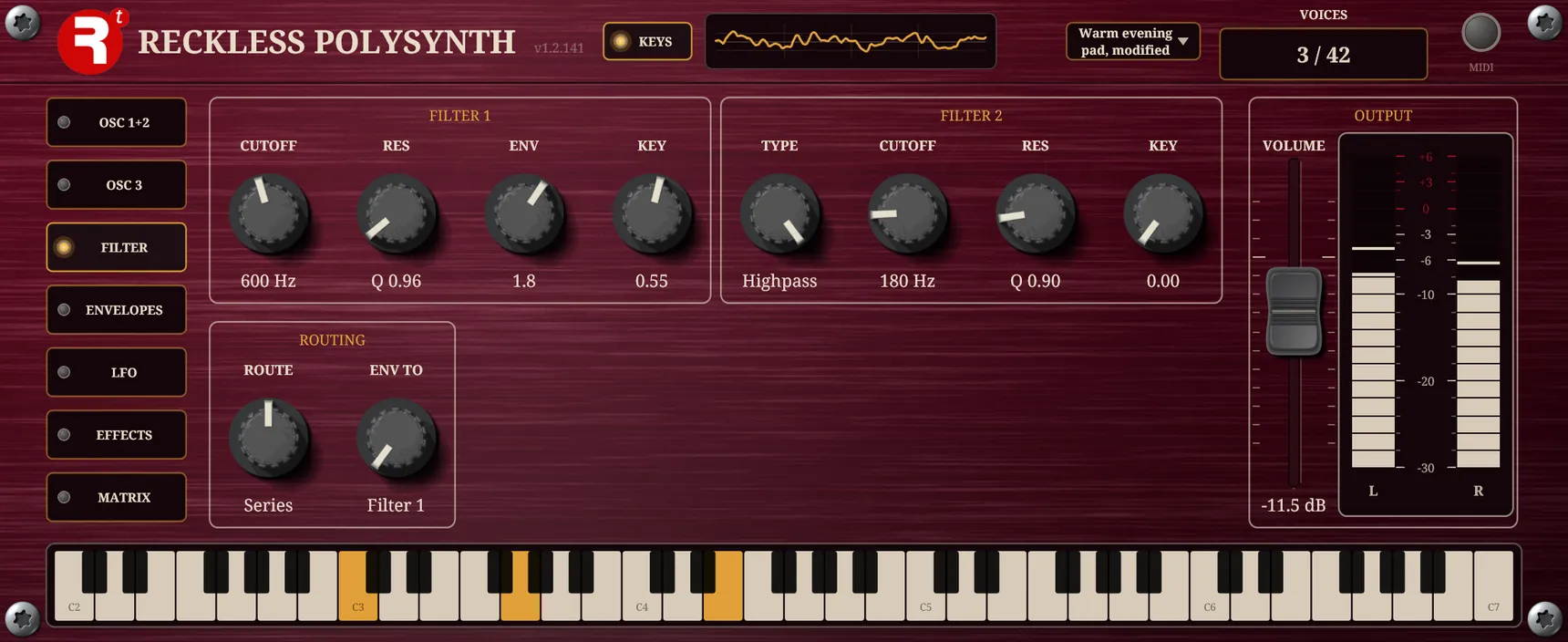
| Control | Range | Default | What it does |
|---|---|---|---|
| CUTOFF | 80 Hz to 8 kHz | 2 kHz | Where the filter starts to cut the highs. Down is dark and muffled. |
| RES | 0 to Self-osc | 0 | Feeds the filter back on itself: a whistle at the cutoff, ringing as you raise it. At the top it sings by itself, and the output limiter keeps it in bounds. |
| ENV | −8 to +8 octaves | 0 | How far the FILTER ENV moves the cutoff. Up opens it as notes start; down closes it. |
| KEY | 0 to 1 | 0 | How far the cutoff follows the keyboard, so high notes stay as bright as low ones. 1 tracks the keys fully. |
FILTER 2 is a different kind of filter, so that the two can do different jobs. Its TYPE is Lowpass, Bandpass (a band around the cutoff) or Highpass (the lows removed), at 12 dB an octave, with its own CUTOFF (80 Hz to 8 kHz), RES (a Q from 0.5 to 20; the bandpass narrows as it rises) and KEY.
The ROUTING box decides how filter 2 joins the voice. ROUTE is Off (filter 2 is not in the sound, the starting setting), Series (filter 1’s output goes through filter 2) or Parallel (both filter the oscillators and the two are averaged). Switching between them glides over about 30 ms, so it can be done while a note is held. ENV TO says which filter the FILTER ENV drives: Filter 1, Filter 2 or Both. The amount is always the ENV knob in FILTER 1, even when the envelope is pointed at filter 2.
In series, filter 2 as a lowpass gives a squelchier, steeper cut, and as a highpass it clears mud from under a dark, resonant filter 1. In parallel, a lowpass and a bandpass give a body with a vowel-like band over it.
Where it comes from
The ladder. Filter 1 is Robert Moog’s design: a chain of four identical transistor stages, each rolling off the highs at a gentle 6 dB an octave, with some of the output fed back to the input. He patented it in the late 1960s and it was the heart of the Minimoog of 1970. Four stages make 24 dB an octave, and the feedback is the resonance: a peak at the cutoff that grows until, at the top of the knob, the filter rings by itself. That is what Self-osc means.
12 against 24. A 12 dB filter has two poles and takes the top off a sound gently, so at the same cutoff more of the high harmonics survive and the sound stays brighter and more open. A 24 dB filter shuts them off decisively, which gives the dark, rounded sound and, with the resonant peak, the sweeping vowel-like quality people mean when they say a synth sounds “analog”. The Minimoog was so widely heard and copied that 24 dB came to be the default picture of a lowpass filter. The other tradition is shown by Oberheim’s SEM modules of the mid-1970s, a two-pole state-variable design that offered lowpass, bandpass and highpass from the same circuit. That is why the panel has both: Filter 1 is the ladder, and Filter 2 is the 12 dB kind, with its faces.
Two filters. A highpass and a lowpass in series, which cuts the lows as well as the highs, was a feature of Korg’s MS-20 of 1978. ROUTE offers series and also parallel, where both filter the sound and the result is the average.
Key follow. On a modular synthesiser the keyboard produced a control voltage that rose by a fixed amount for each octave, one volt in Moog’s convention, and it could be patched to the filter as well as to the oscillators, so that the cutoff followed the notes. KEY is that connection, and it is a knob and not a switch because a partial amount, tracking the keyboard by half, is often what sounds right.
ENVELOPES
Envelopes give a note its shape in time: how it starts, how it holds and how it ends. An envelope is a shape that plays out over each note, in four controls: Attack (the time to rise to full), Decay (the time to fall to the sustain), Sustain (the level held while the key is down, 0 to 1) and Release (the time to die away after the key is let go). Attack runs from 0.5 ms to 5 s; decay and release from 0.5 ms to 20 s. A release carries on from wherever the envelope was when the key came up, so a quick note never jumps.
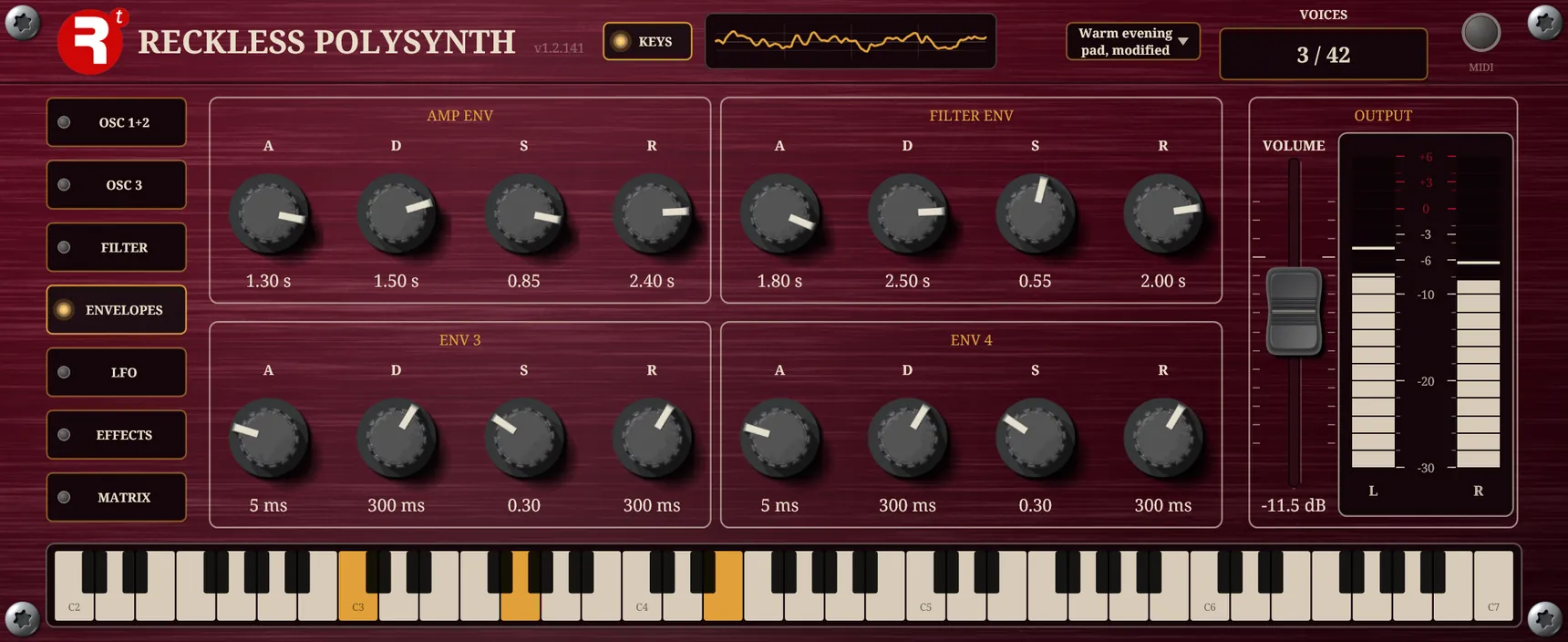
- AMP ENV shapes the loudness of each note. It starts at 5 ms, 300 ms, 0.8 and 300 ms.
- FILTER ENV moves the filter’s cutoff by the amount of the filter’s ENV knob, and starts at the same times with a sustain of 0.3.
- ENV 3 and ENV 4 do nothing by themselves. They are two more shapes for the matrix to send anywhere: a pitch drop, a swell in a duty, a bend of a cross-modulation.
Where it comes from
The four-stage envelope, attack, decay, sustain and release, is usually credited to the composer Vladimir Ussachevsky, who suggested it to Robert Moog in the 1960s. Simpler envelope generators with only an attack and a release also exist, so the interesting question is what the extra two stages are for. A key has two events, down and up, but the sound a note wants has three phases: an onset, a body for as long as the key is held, and a tail after it is let go. Attack and decay shape the onset: a piano hammer is quick and a bowed string slow, and a decay to a lower sustain is how a brass note blares and then settles. Sustain is the level held while the key is down, and release is the tail.
There are two main ones, for the amplifier and the filter, because loudness and brightness rarely follow the same shape: a struck or plucked sound is brightest at its start and darkens as it fades. Envelopes 3 and 4 are extra shapes for the matrix to send wherever you like, a pitch drop or a swell in a duty, for example.
LFO
LFOs make a sound move on its own, without a hand on a knob. An LFO is a slow repeating wave. The fifth page has three, each with four controls: SHAPE (Sine, Triangle, Square, Exponential or Saw, by the pictures round the dial), RATE, a depth and FADE. A lamp on each pulses with its LFO. The three are shared by every note, so a chord moves together.
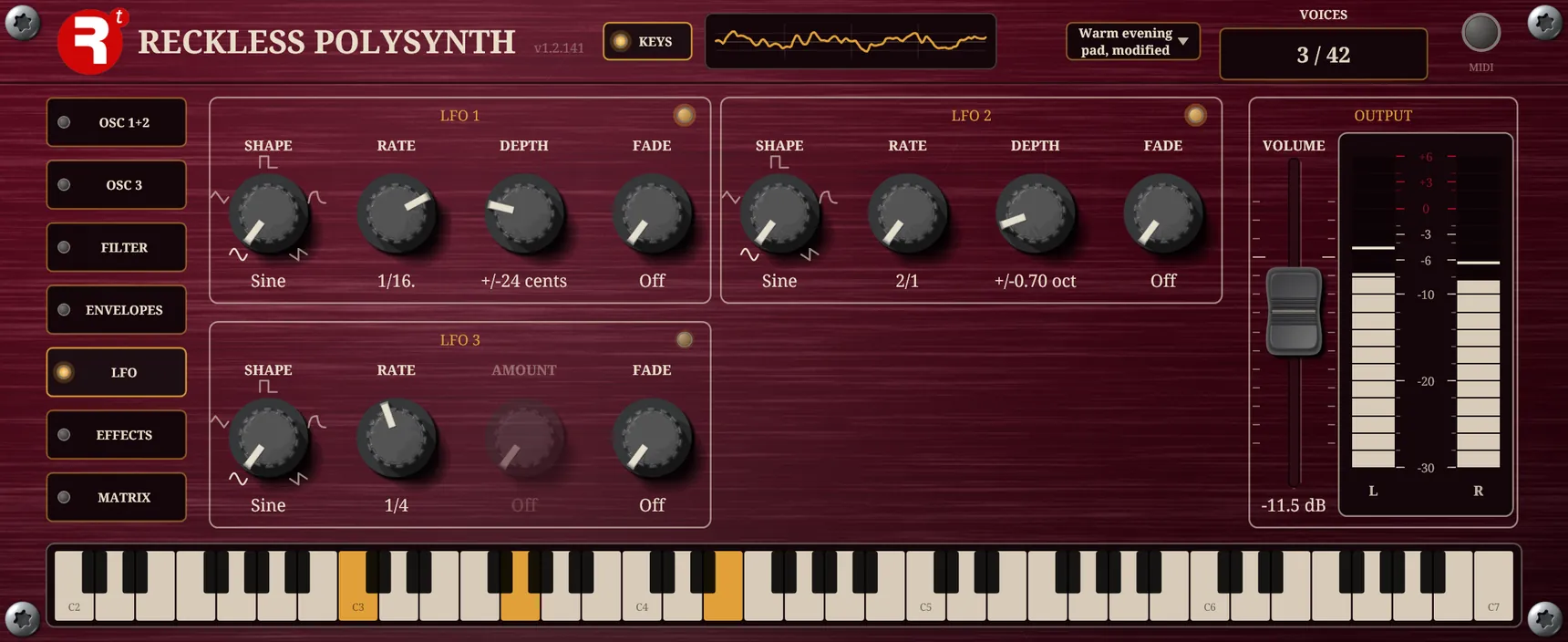
- LFO 1 is the vibrato: it bends the pitch of every oscillator. Its DEPTH (0 to 100 cents) is how far it bends with the mod wheel all the way up. With the wheel down there is no vibrato, so DEPTH alone seems to do nothing. For a vibrato that is on all the time, leave DEPTH at Off and put LFO 1 on Pitch in the matrix.
- LFO 2 is the filter sweep: it moves filter 1’s cutoff. Its DEPTH (0 to 6 octaves either way) is always live.
- LFO 3 has no job of its own. It is a source for the matrix, and its AMOUNT (0 to 100 %) is how much of it every matrix row from LFO 3 hears. It moves nothing until a row names it, and is dimmed until one does.
FADE is the time each note takes, from its own key-down, to bring that LFO in, slowly at first and then building: a vibrato that blooms the longer a note is held, a sweep that arrives after the attack. It starts at 650 ms; below about 20 ms it reads Off and the LFO is there at once. Every LFO starts as a sine at a depth of nothing, so none is in the sound until you raise its DEPTH or AMOUNT.
Tempo
The LFOs are always locked to the tempo. RATE is a note length, one of fifteen from two bars (2/1) to a thirty-second (1/32), longer being slower, with triplets written T, so there is no speed in hertz to set. One cycle lasts the length you choose. While the host plays, the LFO follows the timeline, so after you move the cursor the sweep is where the music is, and two LFOs set to the same length move together; with the host stopped they run on at the same speed. The tempo is the host’s; in the standalone app a BPM box at the right of the bar supplies it.
Where it comes from
An LFO, a low-frequency oscillator, is an oscillator too slow to hear as a pitch, used to move other things. Its first job, vibrato, imitates what singers and string players do by hand. The Minimoog of 1970 put the player’s hand on it with a modulation wheel beside the pitch wheel at the left of the keyboard, and MIDI later made the mod wheel controller 1, which is what scales LFO 1 here. LFO 2, the filter sweep, is the other classic use. LFO 3 is a free one for the matrix.
Locking an LFO to the tempo is not from the 1970s: a 1970s LFO ran at the speed its knob said, and tying it to the beat of a song is a convenience of the age of the sequencer and the DAW. Here it is the only way an LFO runs, so that a sweep is always in time with the music.
EFFECTS
Effects are what turn a dry synthesiser into something that sounds as if it is in a place. The sixth page holds four effects, and they are the real Reckless plugins: the Reckless Mod, Drive, Delay and Oldsverb, not look-alikes. All four start switched off and out of the sound; a Polysynth with none on is simply the voices.
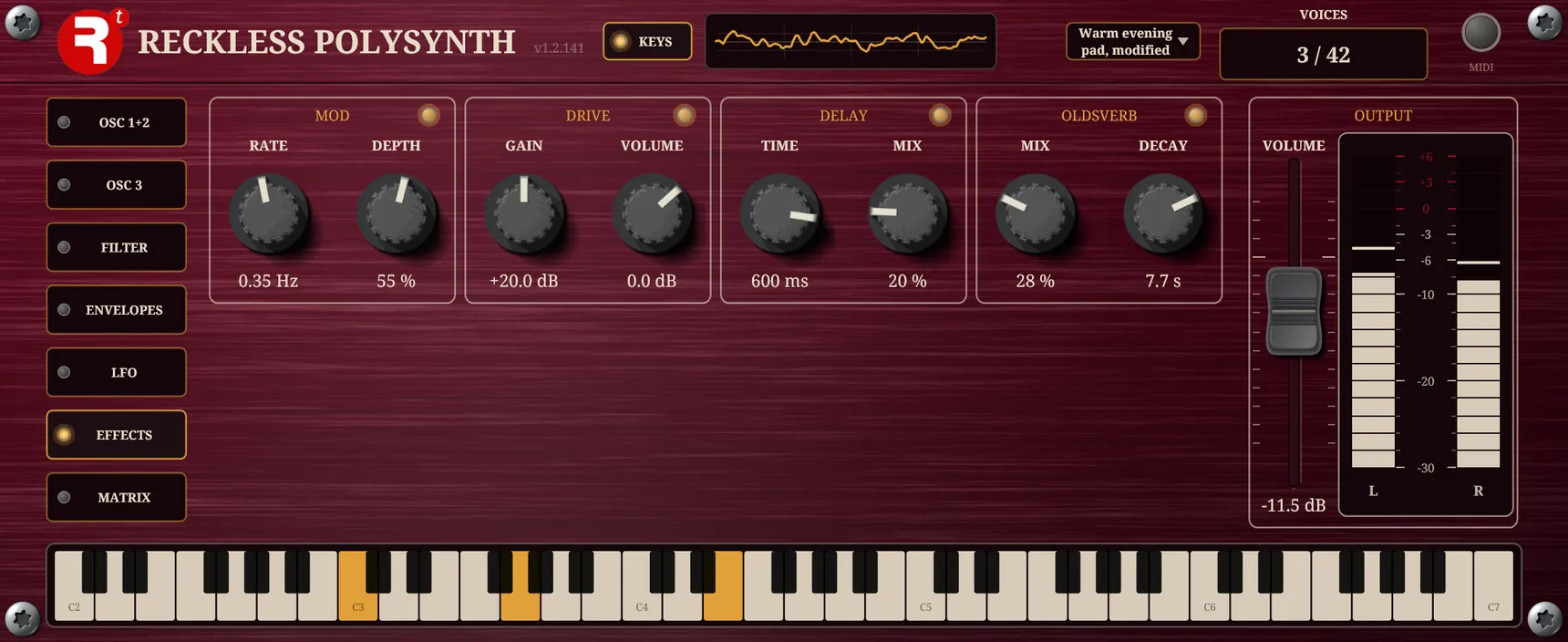
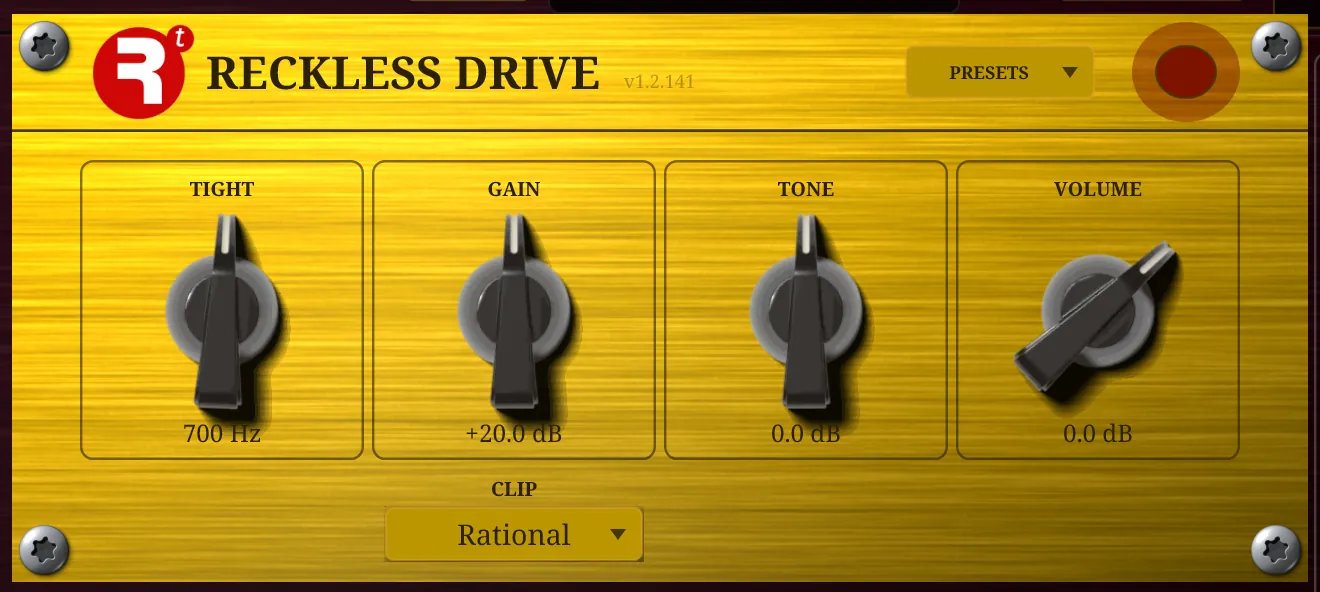
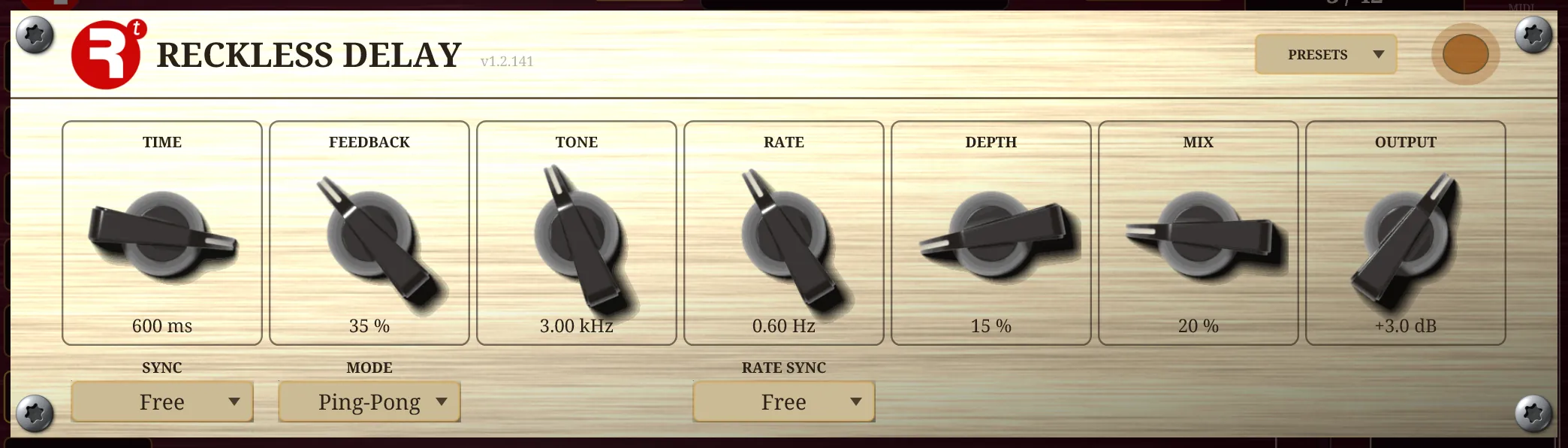
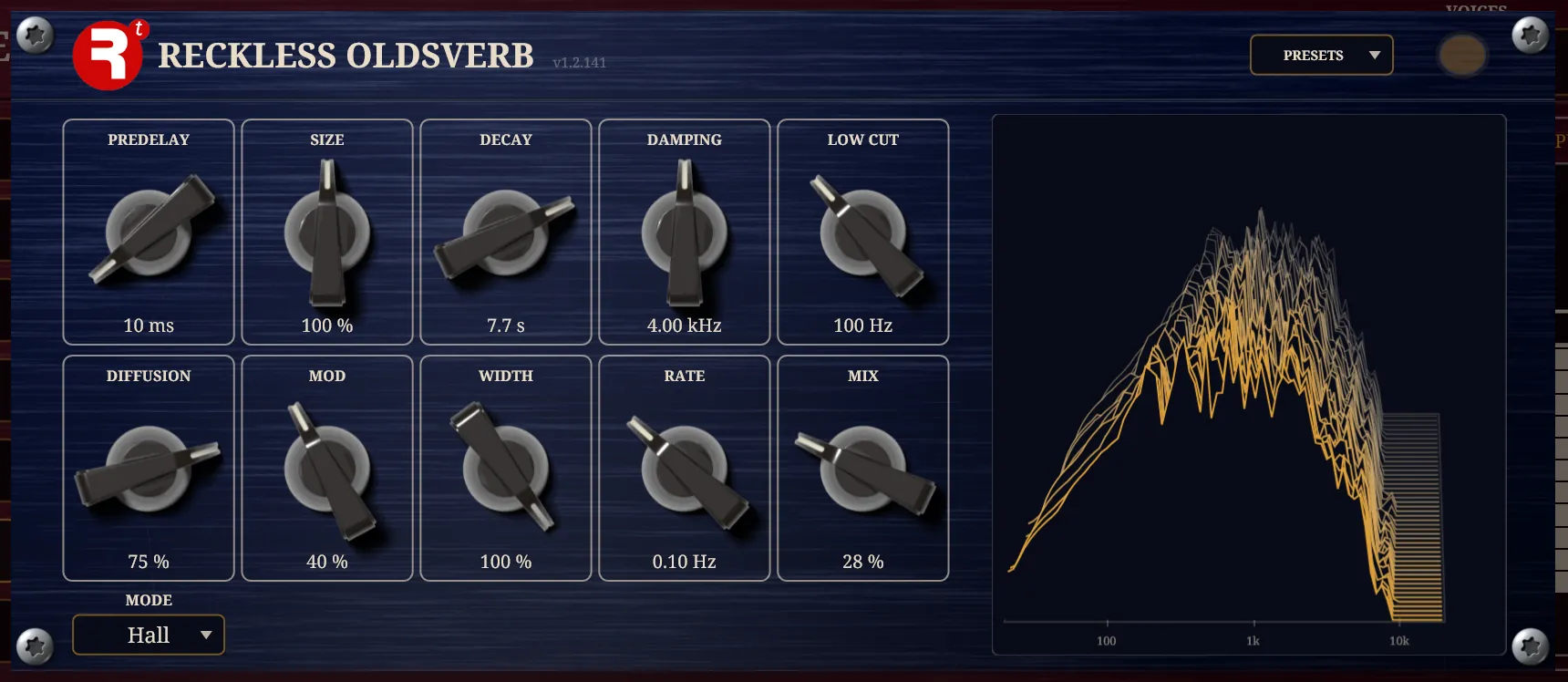
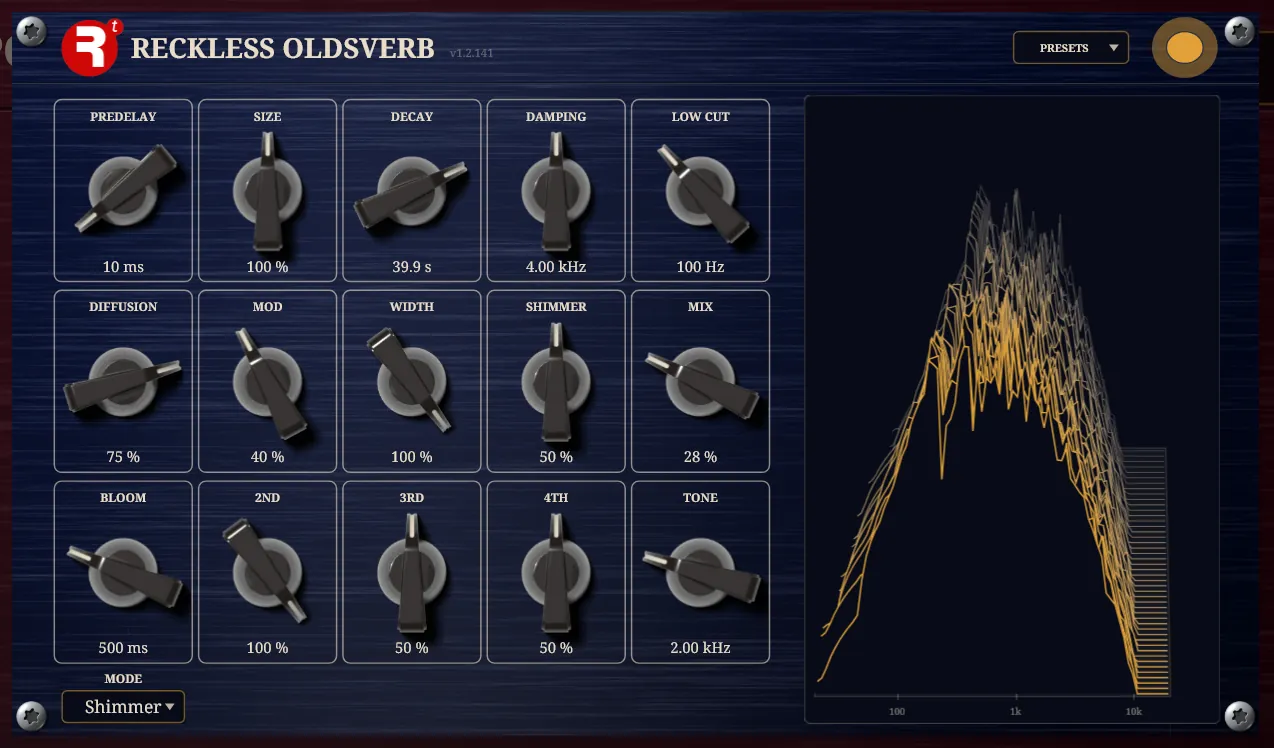
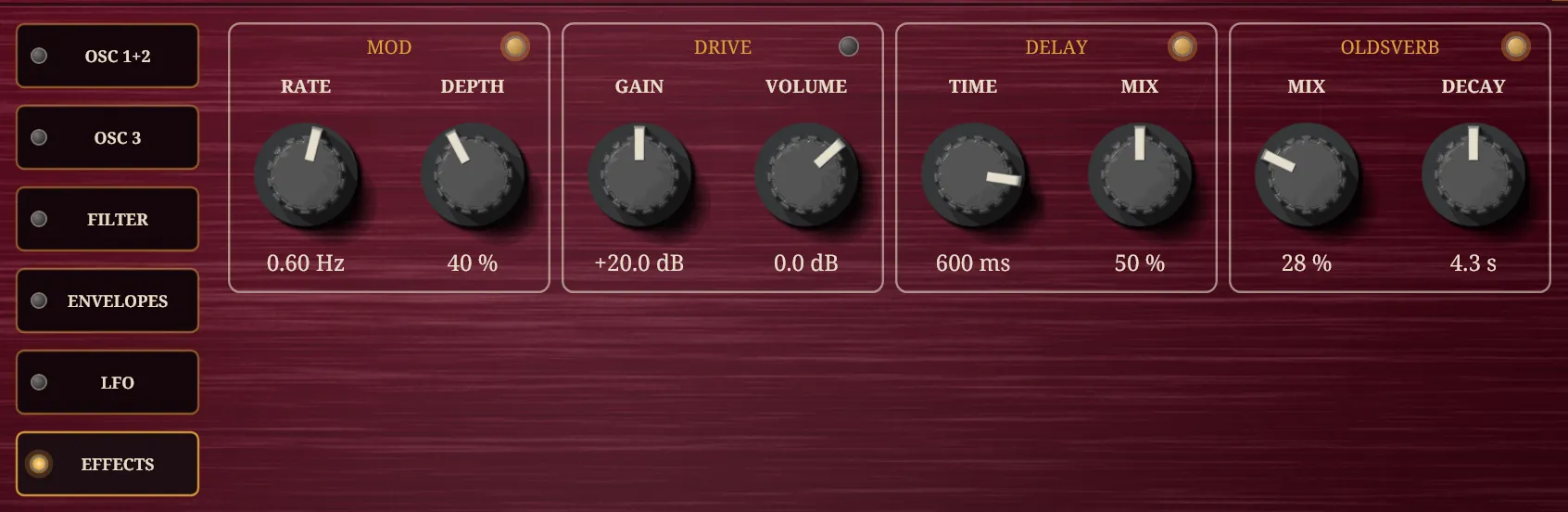
Each stands in a slot with its name as the heading, two knobs that are that plugin’s most used, and an LED at the right end of the heading. Click the LED to switch the effect in and out; it fades over 30 ms. The slot’s knobs are the Mod’s RATE and DEPTH, the Drive’s GAIN and VOLUME, the Delay’s TIME and MIX and the Oldsverb’s MIX and DECAY.
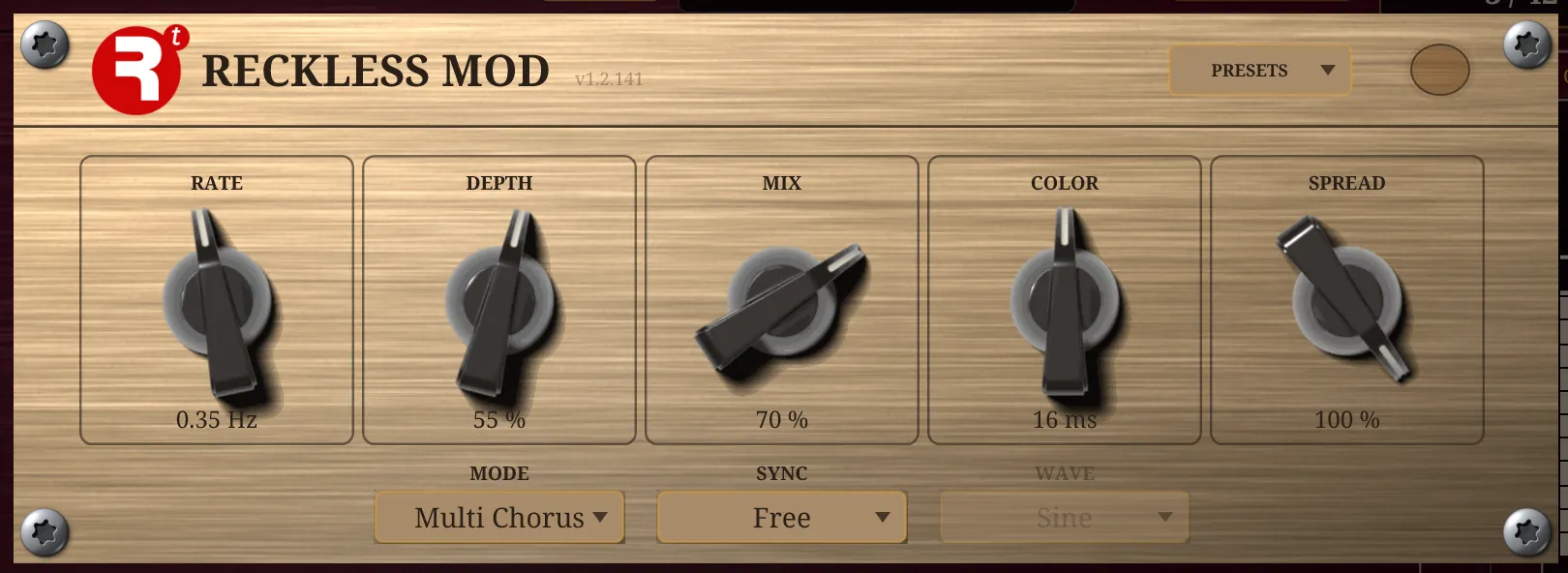
- The rest of an effect’s controls are one click on its heading away. The effect’s own full panel opens over the instrument as a card, with every knob, plate and screen it has as a plugin of its own. Turn them and the Polysynth’s own parameters turn, so they are saved, automated and put in presets.
- The order is yours. The effects run in a chain, starting as Mod, Drive, Delay, Oldsverb, and dragging a heading row to another place in the row rearranges the chain: a reverb before a drive sounds quite different from one after it. The order is kept in a preset, and changing it dips the sound for a moment.
- The effects follow the tempo when they are set to a note length, as the LFOs do.
- The Oldsverb’s MIX is a crossfade, not a send. At 100 % there is no dry sound left at all, only reverb, so start low.
Where it comes from
Chorus. A chorus mixes a sound with a copy of itself delayed by a few milliseconds, the delay swept slowly, so that the copy drifts against the original. The cheap analog way to make the delay was the bucket-brigade device, a chip that passes a signal along a chain of capacitors, which was invented at Philips in the late 1960s. The CE-1 Chorus Ensemble of 1976, the first product Roland sold under its Boss name, is usually named as the first chorus effect sold as a unit of its own. The Mod here is digital rather than a chip, and has five more modes on the same sweep: multi chorus, phaser, flanger, tremolo and vibrato.
Drive. Overdrive was borrowed from the guitar, where a valve amplifier pushed past its limit clips the peaks of the wave and adds harmonics. It is on a synthesiser panel because a plain synthesiser can be too clean, and a little clipping makes a note thicker and more present. Because it clips, it is better placed before the delay and the reverb than after them: you want an echo of a distorted note and not a distorted echo.
Delay. The tape echo recorded a signal on a loop of magnetic tape and played it back from a head a little further along, so that every repeat was a copy of a copy: a little duller and a little more wobbly, with the tape’s speed wavering, each trip round. Roland’s RE-201 Space Echo of 1974 is the best known. The Delay here is that character in software: its TONE darkens each repeat and its RATE and DEPTH put the wobble back, which is what lets echoes sit behind a sound instead of on top of it.
Reverb. Reverb began as real spaces and real objects: the plate, a sheet of steel hung in a frame and set vibrating, which EMT sold in 1957, and the spring, a small tank of coiled wire that was common in organs and guitar amplifiers by the 1960s. Digital reverb came later: EMT’s 250 of 1976 is usually named as the first. The Oldsverb is neither a plate nor a spring. Its Hall mode is built in the manner of the artificial reverberators Manfred Schroeder described in the early 1960s, built from delays and allpass filters; Room is a feedback delay network; and Shimmer puts a pitch shifter in the reverb’s loop so that its tail climbs in octaves, which is a modern idea and nothing like the 1970s.
MATRIX
The matrix is how the instrument’s movement is wired to everything it can move. The last page is eight patch cables. Each row has four fields: a SOURCE (something that moves), a DESTINATION (something to move), a DEPTH (how far, and which way) and a VIA (an optional second source that scales the first). Every row starts empty.
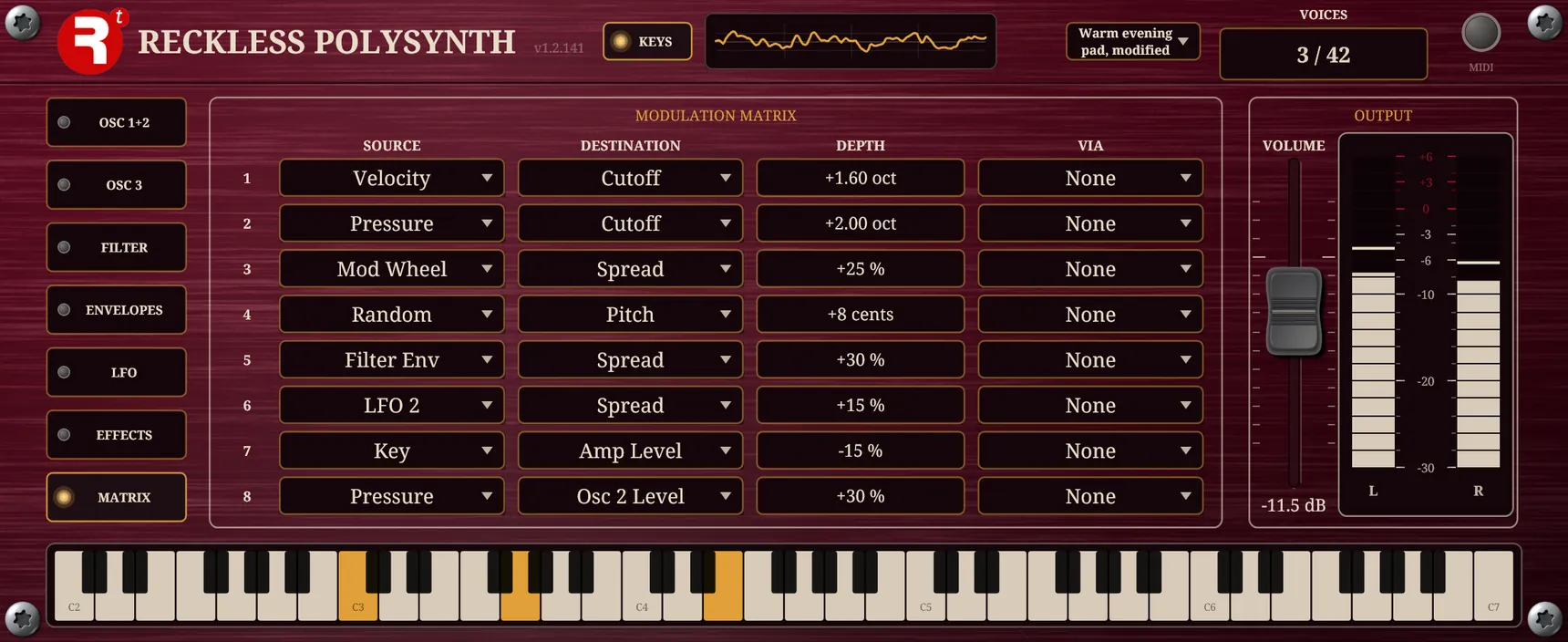
The matrix adds to what the knobs already do. The knob is where the sound rests when the source is at nothing, and the row is how far the source pulls it; a negative depth pulls the other way. The depth reads in the destination’s own unit: octaves for a cutoff, cents for pitch, radians for the cross-modulation amount, steps along the note lengths for an LFO’s rate, a percentage for the rest.
Sources: LFO 1, LFO 2, LFO 3, Amp Env, Filter Env, Env 3, Env 4, Velocity, Key (where on the keyboard the note is), Mod Wheel, Pitch Bend, Pressure (channel aftertouch), Random (a new value for each note), Constant and Step (the bar of the ARP page’s lane that is playing). Destinations: Cutoff, Resonance, Pitch, Filter 2 Cutoff, Filter 2 Resonance, the Level and Duty of each oscillator, Spread, Stereo Width, Amp Level, the Rate of each LFO and Cross-mod Amount.
Worked examples
- A key that feels like a key. Source Velocity, destination Cutoff, depth about +3 octaves, with the FILTER 1 CUTOFF turned down to around 500 Hz. A soft key is dark and a hard key opens the filter upward from there, as a struck string does. (Needs a real keyboard.)
- A pulse that narrows as it decays. Set OSC 1 to Pulse with DUTY around 0.4. Source Filter Env, destination Osc 1 Duty, depth +50 %.
- A wobble you bring in by hand. Raise LFO 3’s AMOUNT to 100 %. Source LFO 3, destination Cutoff, depth +1 octave, via Mod Wheel: the wheel is the depth of the wobble.
- A few cents of life. Source Random, destination Pitch, depth +5 cents: every note lands slightly differently from the last.
Where it comes from
The matrix is the patch cord, tidied. On the modular synthesisers of the 1960s and early 1970s every connection between a source of movement and a thing to be moved was a cable. The ARP 2600 of 1971 wired the usual routes inside and left the rest to patch cords, and later instruments replaced the cords with a table, as in Oberheim’s Xpander of 1984: pick a source, a destination and an amount. The eight slots here are that table, with a via as well, which lets a second source scale the first: the mod wheel as the depth of a wobble.
Random takes a new value for each note. Modular synthesisers had a sample-and-hold, which took a fresh random voltage at each tick of a clock, and the stepped, burbling pattern it made became a sound of its own. The per-note version here is its quieter cousin: a few cents of random pitch gives every note a slightly different life, without the babble.
ARP
The arpeggiator turns a held chord into a pattern. Instead of sounding the keys you hold together, it plays them one after another, over and over, at a note length locked to the tempo. The last page holds it, with a lane of sixteen steps beneath it, and the two work together or apart: the lane can shape the sound under a chord you play by hand, and the arpeggiator can run with the lane doing nothing. A fresh Polysynth has the arpeggiator off, so it plays as it always did until you switch it on.
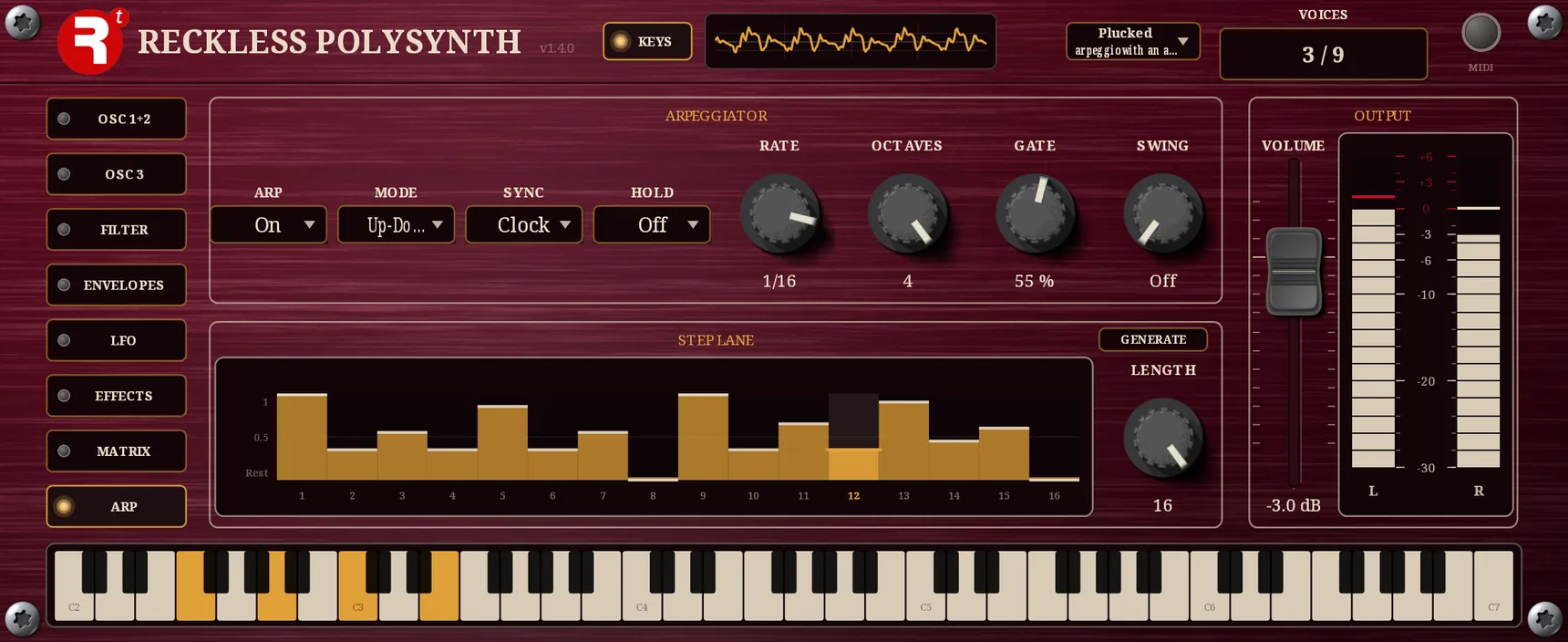
| Control | Range | Default | What it does |
|---|---|---|---|
| ARP | Off, On | Off | Whether the keys you hold are arpeggiated. Off, they sound together as a chord. You can switch it with keys held: the chord you are holding carries on, played the other way. |
| MODE | Up, Down, Up-Down, Down-Up, As played, Random | Up | The order the held notes are played in. |
| SYNC | Clock, Key | Clock | What the pattern is phased to: the host’s beat, or the moment you first press a key. |
| HOLD | Off, On | Off | Keeps the pattern running after you let go of the keys. |
| RATE | 2/1 to 1/32, fifteen note lengths | 1/16 | How long each step lasts, as a note length at the host’s tempo. |
| OCTAVES | 1 to 4 | 1 | How many octaves the held notes are repeated over, each 12 semitones above the last. |
| GATE | 1 to 100 % | 50 % | How much of its step each note is held for: short is staccato, full runs each note into the next. |
| SWING | Off to 100 % | Off | How far every second step is delayed, as a share of half a step. Off is straight. |
| LENGTH | 1 to 16 | 16 | How many of the lane’s sixteen steps play before the pattern starts again. |
MODE sets the order. Up plays the held notes from the lowest and Down from the highest. Up-Down climbs and then descends, and Down-Up the other way about; in both, the note at each turn is played once and not twice. As played keeps the order the keys went down in, so a pattern can be a tune of your own, and Random takes its notes from the whole pattern in no order. OCTAVES repeats the whole order, transposed up, for each octave beyond the first. Each note plays at the velocity of its own key.
RATE is the same list of fifteen note lengths as the LFOs have, from two bars to a thirty-second, longer being slower, and one step lasts one note length. The tempo is the host’s; in the standalone app it is the BPM box at the right of the bar. Turning RATE lets go of the note that is sounding, but a change of tempo does not, so a tempo that is automated or ramped never cuts a note short. GATE and SWING are what give a pattern its feel: a low gate is plucked and clipped, a full one legato, and a swing delays every second note to make a straight pattern skip.
SYNC chooses what the pattern is phased to, and never what it is timed by: the speed is the tempo’s either way, and there is no free rate in hertz. On Clock, the pattern is pinned to the host’s timeline as the LFOs are, so step 1 falls on the note length’s grid from the start of the song. It lines up with the bar however late in it you press the chord, and a take punched in later lands on the same steps as the take before. On Key it is not pinned: the pattern starts at the moment you press the first key of a fresh chord, so it is phased to your hand and not to the bar. Keys added to a chord that is already held do not restart it; letting go of everything and playing again does. HOLD keeps the pattern turning after the keys come up, until you play a new chord, which replaces the old one from step 1.
The step lane
Beneath the arpeggiator is the STEP LANE: sixteen bars, each a value from 0 to 1 for one step. Drag across them to draw. Every bar starts at its bottom, which is a rest, and the readout says so. The lane runs on the arpeggiator’s own clock, one bar to a step, and wraps after LENGTH steps. A rest is a silent step: the arpeggiator plays no note there, and the pattern keeps its place, so the next step that does sound takes the note the rest would have had. Since every bar starts as a rest, switching ARP on with an untouched lane plays nothing at all; raise some bars, or press GENERATE.
GENERATE, in the lane box’s heading, draws all sixteen bars afresh, with about a fifth of them left as rests so that the pattern has gaps. It writes them a bar at a time, each as if you had moved it yourself, so a host that records gestures sees every one.
The lane is also a source in the matrix, called Step: its value is the height of the current bar, and it reads zero on a rest. It reaches the voices at the instant its step begins, and it holds for that step. Sent to Cutoff it is a filter pattern, to Amp Level a rhythmic gate, to an oscillator’s Duty a different timbre for each step, and to an LFO’s rate a pattern of speeds. It does not need ARP to be on. With the arpeggiator off, the lane still runs, so chords you play by hand can have a pattern moving underneath them; with SYNC on Key it starts where your hand does.
Eight of the factory presets use the page, from Plucked arpeggio with an accent lane to Chip arpeggio on a bouncing echo. Chord gate that starts with the hand is the one to open for the lane on its own, under a chord.
Where it comes from
An arpeggio is a chord played one note at a time: the word is Italian, from arpeggiare, to play the harp. A keyboard player does it by hand; an arpeggiator does it for you at an exact rate and, because it is told only which keys are down, lets one hand hold a chord while the pattern makes the movement. The step lane is the other half of the idea. A step sequencer, a row of knobs that each set a value for one step, was one of the modules of the large modular synthesisers. Here a step sets a value in the matrix instead of a pitch, and a step at its bottom is a rest.
Playing it
The Polysynth is an instrument: it makes sound only when it is played, so a freshly opened one is silent until a note arrives from a MIDI keyboard, a MIDI track or the on-screen keyboard. It has no audio input. Velocity sets how loud a note is, the sustain pedal (controller 64) holds released notes, the pitch bend wheel bends by two semitones either way, the mod wheel (controller 1) is the vibrato’s depth, and channel pressure is a matrix source. Twelve more controllers turn knobs directly: a filter cutoff on 74, a resonance on 71, the amplitude envelope on 72, 73 and 75, glide on 5, the vibrato’s rate and depth on 76 and 77, and the reverb and modulation on 91 to 95. With the arpeggiator off, a note lands on the exact sample it arrives, and the instrument adds no latency of its own; with it on, each note lands on the sample its step begins.
Make a sound from scratch: a supersaw pad
The best way to learn an instrument is to build one sound on it from nothing. This one is a supersaw pad with a fast attack, with chorus, a dotted-eighth delay and a reverb: a wide, bright, shimmering sound that suits held chords. It takes 10 steps and about ten minutes, and each step says what to listen for and why the move does what it does, so that you can use the same method on a different sound afterwards.
Each table lists the controls to change, as the plugin names them in the parameter reference at the end of the page and in your host’s list of parameters, with the page and the panel’s own caption where they differ. Controls not mentioned stay at their defaults. A knob can be set by dragging it or by clicking its value and typing; where a time is given in seconds you can also type it in milliseconds.
1 Start from nothing
Open the PRESETS menu and choose Reset to defaults. That is the init patch: one sawtooth through a lowpass filter at 2 kHz, every effect off and nothing modulating anything. Play a chord and listen to how plain it is. A good pad is built by changing one thing at a time and hearing what each change did, and you can only do that from a known starting point.
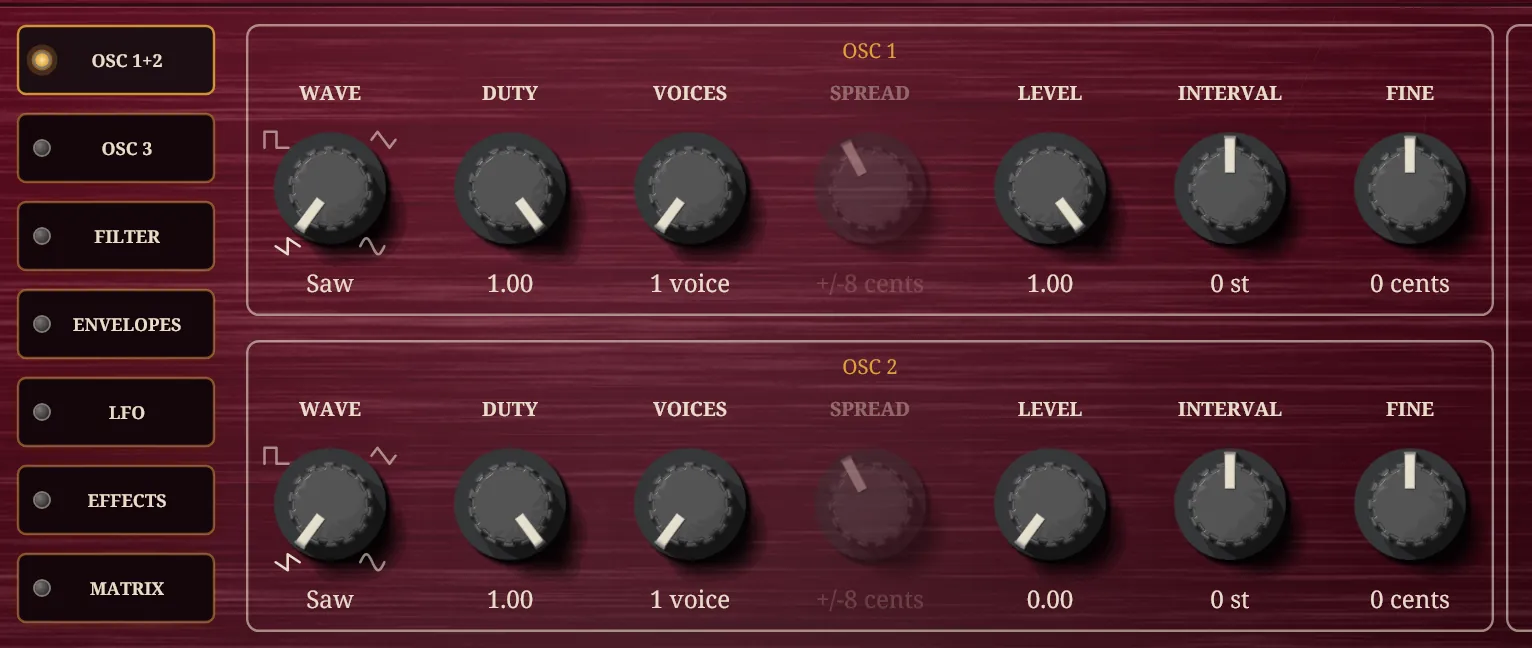
Listen for. A thin, buzzy, single-oscillator sound that dies away quickly when you let go.
2 Make the saw into a supersaw
A supersaw is a stack of sawtooths tuned slightly apart. Where two pitches are a few cents apart they drift in and out of step, so the sound swells and thins many times a second, and with seven of them beating at different rates it never settles: that shimmer is the whole effect. Voices is how many copies there are and Spread is how far apart in pitch they are. They are fanned across the stereo field as well, left to right in order of pitch, which is where the width comes from. With an odd number of copies one of them sits exactly on the note.
| Control | Set to | Where it is |
|---|---|---|
| Oscillator 1: Voices | 7 copies | OSC 1+2 page: VOICES |
| Oscillator 1: Spread | 14 cents | OSC 1+2 page: SPREAD |
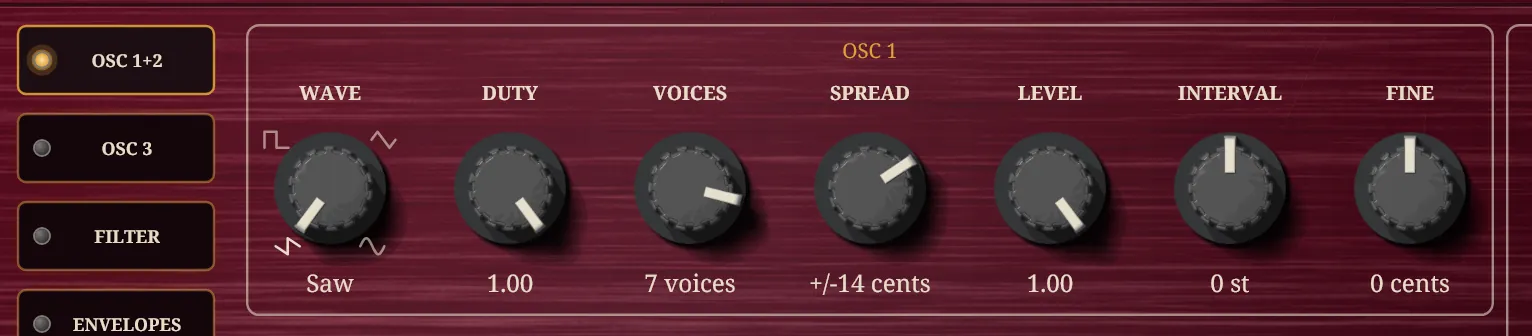
Listen for. Hold one note and move Spread slowly from 0 to 20. At 0 the seven copies are one saw, at 14 they shimmer, and by 20 a low note starts to sound out of tune. Find where it stops being rich and starts being wrong, and stay a little inside it.
3 Add a layer an octave below
One stack is wide but thin underneath. A second oscillator an octave down, with fewer copies and a slightly different spread and tuning, adds weight underneath without adding more top end. Its Level is half the first's, so it supports rather than competes. Oscillator 2 starts at nothing, so raising its Level is what brings it into the sound.
| Control | Set to | Where it is |
|---|---|---|
| Oscillator 2: Level | 0.5 | OSC 1+2 page: LEVEL |
| Oscillator 2: Voices | 5 copies | OSC 1+2 page: VOICES |
| Oscillator 2: Spread | 10 cents | OSC 1+2 page: SPREAD |
| Oscillator 2: Interval | −12 semitones | OSC 1+2 page: INTERVAL |
| Oscillator 2: Fine | 4 cents | OSC 1+2 page: FINE |
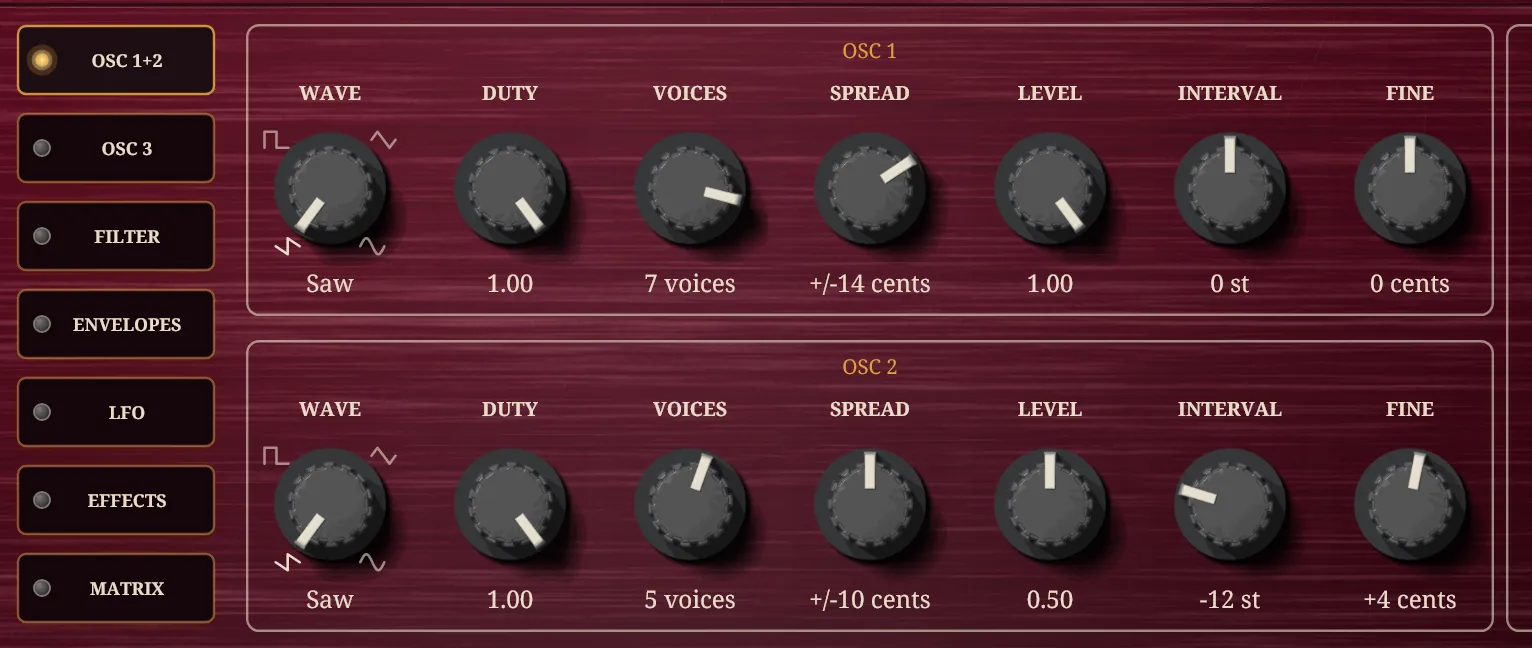
Listen for. The sound should get bigger and darker without getting louder at the top. Switch Level between 0 and 0.5 a few times to hear what it contributes.
4 Darken it with the filter
Sawtooths are bright, and the filter is where you decide how bright. Filter 1 cuts the harmonics above its Cutoff, so lowering it from 2 kHz to 1.2 kHz takes the edge off and leaves the body. Key Follow makes the cutoff rise and fall with the note you play. Without it, a high note has fewer of its harmonics left under a fixed cutoff than a low one, so the top of a chord sounds duller than the bottom; at 0.5 the cutoff follows the keyboard half as fast as the pitch does, which keeps the balance without making the top shrill. Leave Resonance at nothing: on a pad a resonant peak turns into a whistle on every chord.
| Control | Set to | Where it is |
|---|---|---|
| Filter 1: Cutoff | 1200 Hz | FILTER page: CUTOFF |
| Filter 1: Key Follow | 0.5 | FILTER page: KEY |
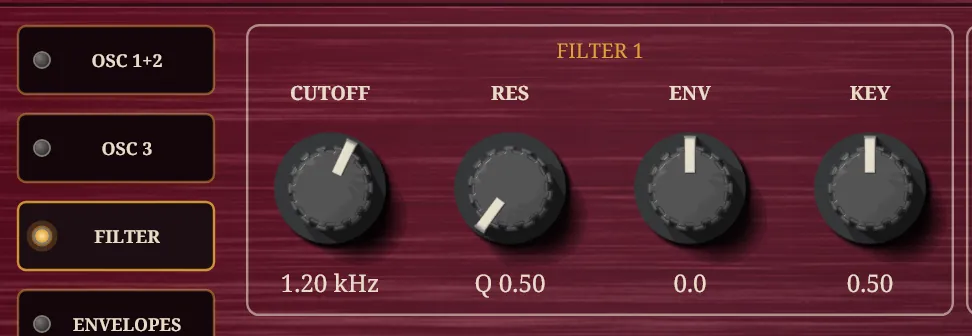
Listen for. Play a low chord and then a high one, with Key Follow at 0 and then 0.5. At 0 the high one dulls; at 0.5 the two sound like the same instrument.
5 Shape the note with the envelopes
An envelope is what a note does over time. The amplitude envelope controls the loudness: a fast attack of 30 ms is quick enough to feel played, and not so quick as to click. Sustain at 0.9 holds the chord at nearly full level while the key is down, and a Release of 1.4 s lets it fade away after you lift your hands, which is what makes a pad feel like a pad. The filter envelope does the same job on brightness, and its Attack of 20 ms is deliberately close to the amplitude's 30 ms, so the note arrives bright instead of opening up a moment after you hear it. With Filter 1 Envelope set to +2 octaves, each note starts two octaves above the cutoff and falls back (Decay 1.5 s) to a Sustain of 0.5, an octave above the cutoff, while you hold the key. The sound speaks at once and then mellows.
| Control | Set to | Where it is |
|---|---|---|
| Amplitude envelope: Attack | 0.03 s (30 ms) | ENVELOPES page: A |
| Amplitude envelope: Decay | 0.8 s (800 ms) | ENVELOPES page: D |
| Amplitude envelope: Sustain | 0.9 | ENVELOPES page: S |
| Amplitude envelope: Release | 1.4 s | ENVELOPES page: R |
| Filter 1: Envelope | 2 octaves | FILTER page: ENV |
| Filter envelope: Attack | 0.02 s (20 ms) | ENVELOPES page: A |
| Filter envelope: Decay | 1.5 s | ENVELOPES page: D |
| Filter envelope: Sustain | 0.5 | ENVELOPES page: S |
| Filter envelope: Release | 1.4 s | ENVELOPES page: R |
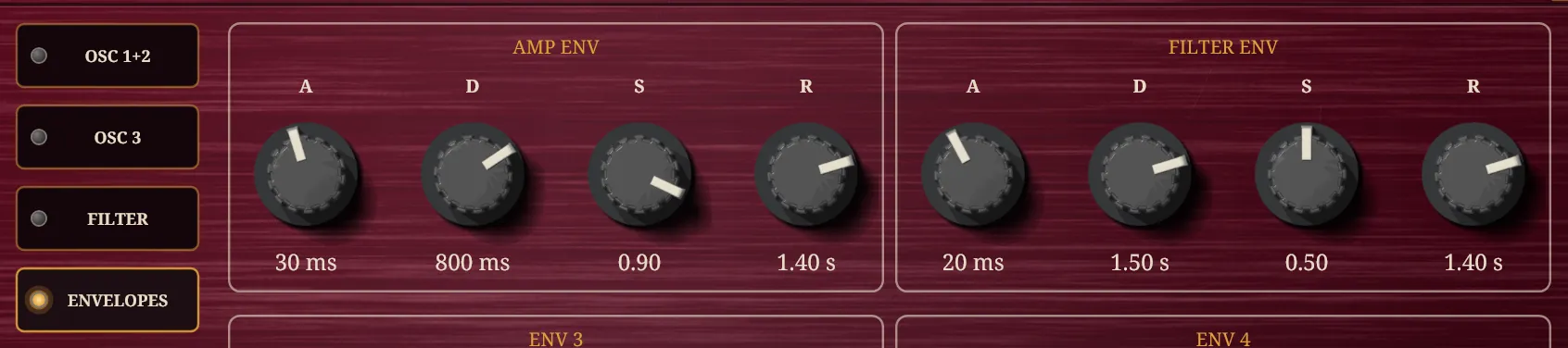
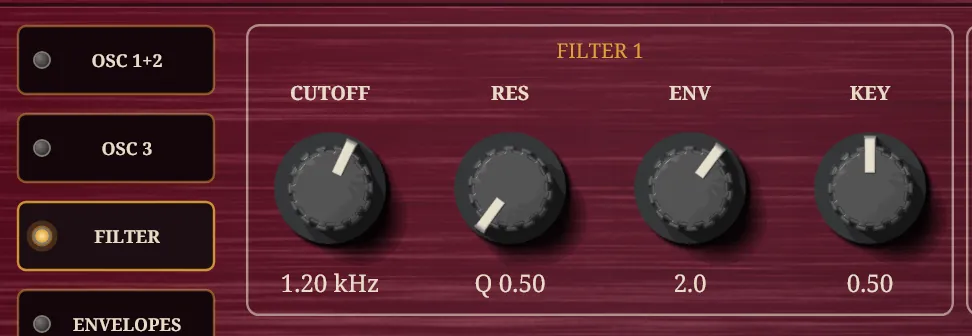
Listen for. Play a chord and hold it. It should arrive bright, mellow over a second or so and then hold steady. Let go and it should ring away rather than stop. If the opening is too sharp, lengthen the filter envelope's Attack; if it is too dull, raise Filter 1 Envelope.
6 Make it breathe (optional)
A held chord that never moves sounds like an organ. An LFO is a slow repeating wave, and here it is locked to the tempo, so Rate is a note length and 2/1, two bars, is the slowest. Cutoff on LFO 2 sweeps filter 1's corner up and down by that many octaves either way, so 0.4 is a gentle swell and fall, a little over a third of an octave each side of where the envelope has left it.
| Control | Set to | Where it is |
|---|---|---|
| LFO 2: Rate | 2/1 | LFO page: RATE |
| LFO 2: Cutoff | 0.4 octaves | LFO page: DEPTH |
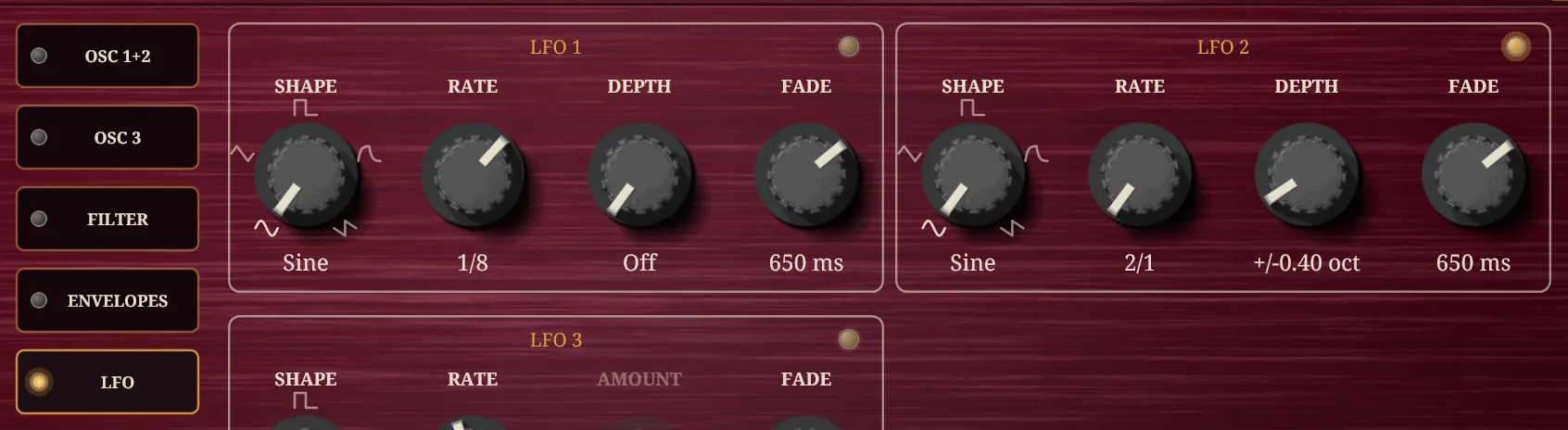
Listen for. Start the host playing at about 90 BPM and hold a chord for a few bars. The brightness should rise and fall in time with the music, once every two bars.
7 Chorus
A chorus mixes the sound with a copy of itself delayed by a few milliseconds, the delay swept slowly by an LFO, which makes the copy drift a little in pitch and in time against the original. It widens and softens, and it smears the beating of the detuned saws so that the stack sounds less like seven oscillators and more like one large one. It goes first in the chain so the delay and the reverb that follow repeat the widened sound, not the plain one. Keep it moderate: the supersaw is already wide.
| Control | Set to | Where it is |
|---|---|---|
| Mod: Enable | On | Effects page: the LED in the slot's heading |
| Mod: Rate | 0.6 Hz | Effects page: RATE on the slot |
| Mod: Depth | 40 % | Effects page: DEPTH on the slot |
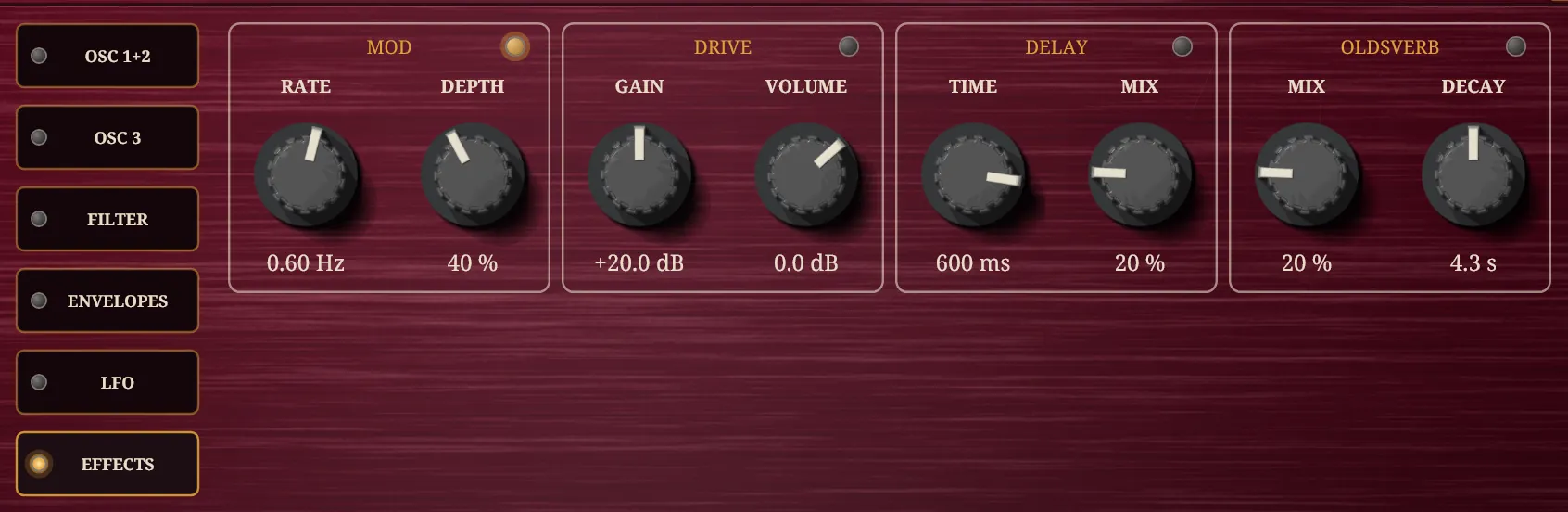
Listen for. Switch the effect on and off with its LED while you hold a chord. It should get wider and a little more liquid. If the pitch seems to wobble, lower Depth.
8 A dotted-eighth delay
Delay repeats the sound after a time, and each repeat is a little quieter and darker than the one before. Setting Sync to 1/8., a dotted eighth, locks the time to the tempo and makes it three sixteenths long. Against a steady pulse that lands between the beats instead of on them, so the repeats interlock with what you play and give it a skipping rhythm. It is the delay worth reaching for on rhythmic material. With Sync set, the Time knob is overridden. Feedback is how many repeats there are; each is already darker than the one before, and the Delay's Tone will push them further back still if you want them under the playing rather than beside it.
| Control | Set to | Where it is |
|---|---|---|
| Delay: Enable | On | Effects page: the LED in the slot's heading |
| Delay: Sync | 1/8. | Effects page: click the slot's heading for its full panel |
| Delay: Feedback | 45 % | Effects page: click the slot's heading for its full panel |
| Delay: Mix | 50 % | Effects page: MIX on the slot |
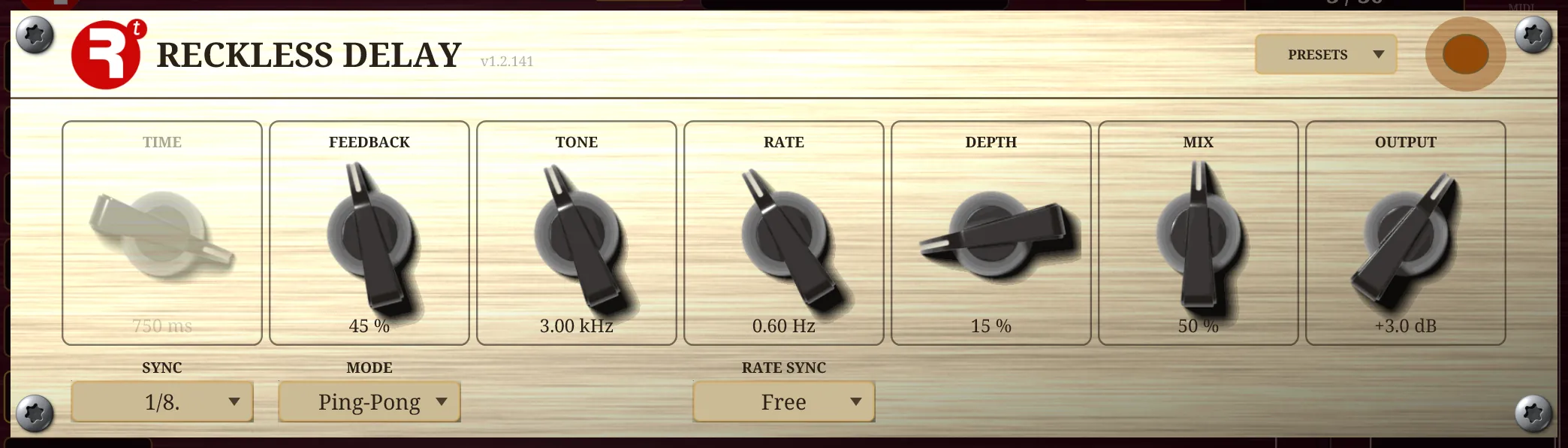
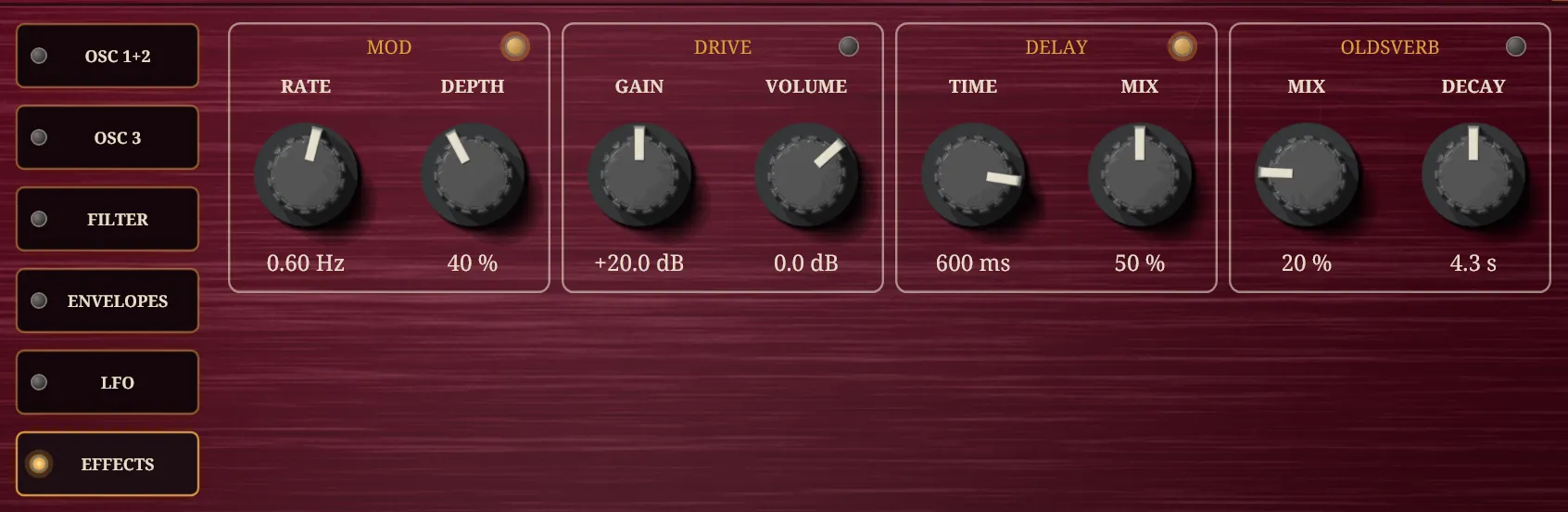
Listen for. Play a short chord and stop. You should hear two or three repeats that skip along behind it, each darker than the last, the third already faint. Mix is a crossfade rather than a send, so raising it past 50 % starts taking the dry sound away: if the repeats crowd the playing, lower it; if they die too fast, raise Feedback.
9 Reverb
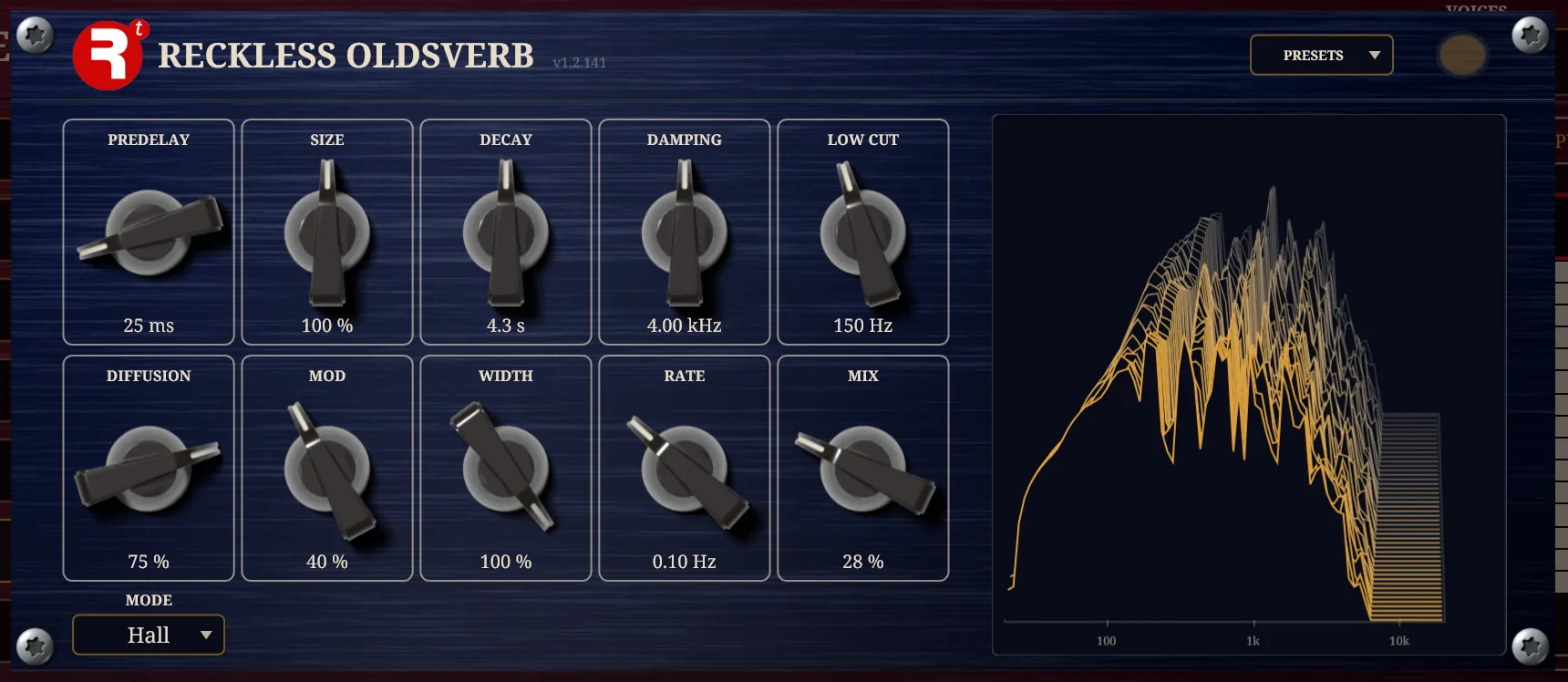
Reverb is the room the sound is in. The Oldsverb is last in the chain because reverb belongs on the finished sound, chorus and echoes included. Its Hall, which is where it already stands, suits a pad. Predelay holds the reverb back by 25 ms so the start of each note stays clear before the space comes in, and Low Cut at 150 Hz keeps the bass out of the reverb, where it turns to mud. If the tail sounds brighter than the note itself, Damping takes the top off it, as a real hall does. The Oldsverb's Mix is a crossfade, not a send: at 100 % there is no dry sound at all, so go in small steps.
| Control | Set to | Where it is |
|---|---|---|
| Oldsverb: Enable | On | Effects page: the LED in the slot's heading |
| Oldsverb: Predelay | 25 ms | Effects page: click the slot's heading for its full panel |
| Oldsverb: Low Cut | 150 Hz | Effects page: click the slot's heading for its full panel |
| Oldsverb: Mix | 28 % | Effects page: MIX on the slot |
Listen for. Play a chord, let go and listen to the tail. It should be long enough to blend one chord into the next and not so long that it blurs a change of harmony. Shorten Decay if it does.
10 Set the level, and play
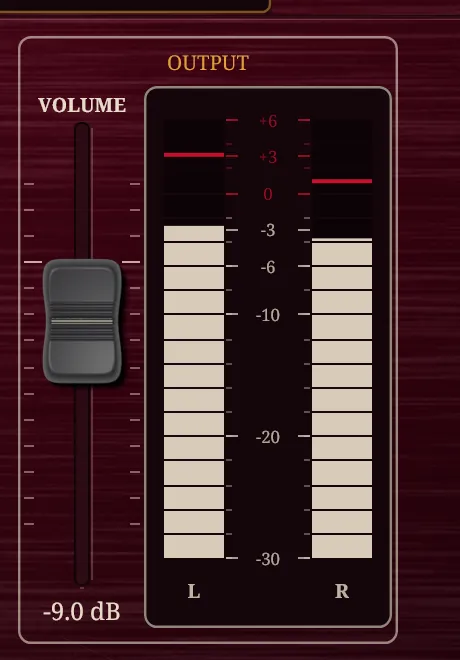
Two stacks of detuned saws through three effects is a lot of sound, so bring the master Volume down until the meters on the right stay below the top on your loudest chord. Then play, with a real keyboard if you have one. Velocity makes the pad louder as you play harder, because the amplitude envelope follows it, so a pad can be played as an instrument and not just held.
| Control | Set to | Where it is |
|---|---|---|
| Master: Volume | −9 dB | VOLUME fader, at the right of every page |
Listen for. Compare a light chord with a hard one, and a short stab with a held one. Notice what you would change.
What you just did, and where to go from here
Every sound on this instrument is made in the same order: choose a raw shape, decide how bright it is, decide how it moves in time, then put it in a space. The pad above is one answer to each of those four questions, and each answer is a control you can change. Make the amplitude Attack half a second and the pad swells in like strings. Change Wave to Pulse and set Duty to about 0.4 with an envelope pointed at it and it is a different animal. Put the chorus after the delay, by dragging its heading to the right of the Delay, and the echoes themselves swirl. Switch Filter 2 on in series as a highpass at a few hundred hertz and the pad loses its low end and becomes airy.
That is what the instrument is for. The 66 factory presets are starting points, and a good use of them is to open one and take it apart the way this page built one up. But the sound that is yours is the one you find by turning things, so treat this pad as a first draft: change it, break it and find out what you like.
Every control name and value in this tutorial is held to tools/polysynth-parameters.json when the page is built (32 settings in 10 steps): the id must exist, a choice must be one of its choices, a number inside its minimum and maximum. The patch was auditioned on 2026-11-15 and corrected as a result: the filter envelope's attack came down from 120 ms to 20 ms, because the amplitude attack was genuinely fast but the filter opened from a low base and left the onset 18.7 dB down above 1.5 kHz in its first 20 ms, so the page promised a fast attack it did not deliver; the delay's mix and feedback went up because its echoes sat 17.7 dB under the note while the step taught them as one of the four things that make the sound; and six settings were removed for doing nothing at all, among them a Chorus Mix that only Multi Chorus reads and whose step advised keeping it moderate.Every parameter, 171 in all
Every control the Polysynth has, generated from the plugin’s own parameter list, so it cannot drift from the instrument. Each is a parameter your host sees and can automate, and every one is saved in a preset. The id is the parameter’s own name, as it appears in a preset file.
Master 5
| Id | Control | Range or choices | Default | What it does |
|---|---|---|---|---|
master_volume_db | Volume | −40 to 12 dB | −6 dB | the instrument's output level |
master_tune_cents | Tune | −100 to 100 cents | 0 cents | the whole instrument's pitch, up to a semitone either way; zero is concert pitch |
voice_polyphony | Polyphony | 1 to 32 voices | 16 voices | the most notes sounding at once; one plays a single line |
voice_glide_s | Glide | 0.002 to 5 s | 0.002 s | how long a note takes to slide from the pitch before it; at the bottom it jumps straight to each note |
ampenv_velocity_percent | Amp Velocity | 0 to 100 % | 100 % | how far a key's velocity sets the note's loudness; at the bottom every note plays at full level |
Oscillator 1 7
| Id | Control | Range or choices | Default | What it does |
|---|---|---|---|---|
osc1_wave | Wave | Saw, Pulse, Triangle, Sine | Saw | the waveform oscillator 1 plays: saw, pulse, triangle or sine |
osc1_duty | Duty | 0 to 1 | 1 | how far oscillator 1's waveform is reshaped: the pulse narrows, the saw ramps, the triangle leans, and the top of the travel is the plain waveform; a sine ignores it |
osc1_voices | Voices | 1 to 8 copies | 1 copies | how many copies of oscillator 1's waveform are summed; one is a plain oscillator, several are a detuned stack |
osc1_spread_cents | Spread | 0 to 20 cents | 8 cents | how far apart oscillator 1's copies are detuned; it does nothing with a single copy |
osc1_level | Level | 0 to 1 | 1 | how much of oscillator 1 reaches the filter |
osc1_interval_semitones | Interval | −24 to 24 semitones | 0 semitones | oscillator 1's offset from the played note, in whole semitones |
osc1_fine_cents | Fine | −50 to 50 cents | 0 cents | oscillator 1's fine tuning, up to half a semitone either way |
Oscillator 2 7
| Id | Control | Range or choices | Default | What it does |
|---|---|---|---|---|
osc2_wave | Wave | Saw, Pulse, Triangle, Sine | Saw | the waveform oscillator 2 plays: saw, pulse, triangle or sine |
osc2_duty | Duty | 0 to 1 | 1 | how far oscillator 2's waveform is reshaped: the pulse narrows, the saw ramps, the triangle leans, and the top of the travel is the plain waveform; a sine ignores it |
osc2_voices | Voices | 1 to 8 copies | 1 copies | how many copies of oscillator 2's waveform are summed; one is a plain oscillator, several are a detuned stack |
osc2_spread_cents | Spread | 0 to 20 cents | 8 cents | how far apart oscillator 2's copies are detuned; it does nothing with a single copy |
osc2_level | Level | 0 to 1 | 0 | how much of oscillator 2 reaches the filter |
osc2_interval_semitones | Interval | −24 to 24 semitones | 0 semitones | oscillator 2's offset from the played note, in whole semitones |
osc2_fine_cents | Fine | −50 to 50 cents | 0 cents | oscillator 2's fine tuning, up to half a semitone either way |
Oscillator 3 7
| Id | Control | Range or choices | Default | What it does |
|---|---|---|---|---|
osc3_wave | Wave | Saw, Pulse, Triangle, Sine | Saw | the waveform oscillator 3 plays: saw, pulse, triangle or sine |
osc3_duty | Duty | 0 to 1 | 1 | how far oscillator 3's waveform is reshaped: the pulse narrows, the saw ramps, the triangle leans, and the top of the travel is the plain waveform; a sine ignores it |
osc3_voices | Voices | 1 to 8 copies | 1 copies | how many copies of oscillator 3's waveform are summed; one is a plain oscillator, several are a detuned stack |
osc3_spread_cents | Spread | 0 to 20 cents | 8 cents | how far apart oscillator 3's copies are detuned; it does nothing with a single copy |
osc3_level | Level | 0 to 1 | 0 | how much of oscillator 3 reaches the filter |
osc3_interval_semitones | Interval | −24 to 24 semitones | 0 semitones | oscillator 3's offset from the played note, in whole semitones |
osc3_fine_cents | Fine | −50 to 50 cents | 0 cents | oscillator 3's fine tuning, up to half a semitone either way |
Mixer 2
| Id | Control | Range or choices | Default | What it does |
|---|---|---|---|---|
mix_noise_level | Noise | 0 to 1 | 0 | how much noise is mixed in beside the oscillators |
mix_stereo_width | Stereo Width | 0 to 1 | 1 | how far the detuned copies fan across the stereo field; it needs an oscillator with more than one copy and some spread |
Cross-modulation 2
| Id | Control | Range or choices | Default | What it does |
|---|---|---|---|---|
xmod_source | Source | Off, Osc 1, Osc 2 | Off | what bends oscillator 3's phase: oscillator 1, oscillator 2 or nothing |
xmod_index_radians | Index | 0 to 10 radians | 0 radians | how far oscillator 3's phase is bent, in radians, narrowing as the pitch rises; it acts only while both oscillators are sines |
Filter 1 4
| Id | Control | Range or choices | Default | What it does |
|---|---|---|---|---|
filter1_cutoff_hz | Cutoff | 80 to 8000 Hz | 2000 Hz | filter 1's cutoff: where it starts to cut the highs |
filter1_resonance | Resonance | 0 to 4 | 0 | how much filter 1 is fed back on itself: a whistle at the cutoff, ringing as it climbs |
filter1_env_octaves | Envelope | −8 to 8 octaves | 0 octaves | how far the filter envelope moves filter 1's cutoff, in octaves; positive opens it as a note starts, negative closes it |
filter1_key_follow | Key Follow | 0 to 1 | 0 | how far filter 1's cutoff follows the keyboard, so high notes stay as bright as low ones |
Filter 2 and routing 6
| Id | Control | Range or choices | Default | What it does |
|---|---|---|---|---|
filter2_type | Type | Lowpass, Bandpass, Highpass | Lowpass | what filter 2 passes: lowpass, bandpass or highpass |
filter2_cutoff_hz | Cutoff | 80 to 8000 Hz | 2000 Hz | filter 2's cutoff: the lowpass cuts above it, the highpass below it |
filter2_resonance_q | Resonance | 0.5 to 20 | 0.707107 | filter 2's Q: how sharply it rings at its cutoff |
filter2_key_follow | Key Follow | 0 to 1 | 0 | how far filter 2's cutoff follows the keyboard |
filter_routing | Filter Routing | Off, Series, Parallel | Off | how filter 2 joins the voice: off, after filter 1 in series, or beside it in parallel with the two averaged |
filter_env_target | Filter Envelope To | Filter 1, Filter 2, Both | Filter 1 | which filter the filter envelope drives: filter 1, filter 2 or both |
Amplitude envelope 4
| Id | Control | Range or choices | Default | What it does |
|---|---|---|---|---|
ampenv_attack_s | Attack | 0.0005 to 5 s | 0.005 s | how long the amplitude envelope takes to rise once a key goes down |
ampenv_decay_s | Decay | 0.0005 to 20 s | 0.3 s | how long the amplitude envelope takes to fall from its peak to the sustain level |
ampenv_sustain | Sustain | 0 to 1 | 0.8 | the level the amplitude envelope holds while the key stays down |
ampenv_release_s | Release | 0.0005 to 20 s | 0.3 s | how long the amplitude envelope takes to fade once the key comes up |
Filter envelope 4
| Id | Control | Range or choices | Default | What it does |
|---|---|---|---|---|
filterenv_attack_s | Attack | 0.0005 to 5 s | 0.005 s | how long the filter envelope takes to rise once a key goes down |
filterenv_decay_s | Decay | 0.0005 to 20 s | 0.3 s | how long the filter envelope takes to fall from its peak to the sustain level |
filterenv_sustain | Sustain | 0 to 1 | 0.3 | the level the filter envelope holds while the key stays down |
filterenv_release_s | Release | 0.0005 to 20 s | 0.3 s | how long the filter envelope takes to fade once the key comes up |
Envelope 3 4
| Id | Control | Range or choices | Default | What it does |
|---|---|---|---|---|
env3_attack_s | Attack | 0.0005 to 5 s | 0.005 s | how long envelope 3 takes to rise once a key goes down |
env3_decay_s | Decay | 0.0005 to 20 s | 0.3 s | how long envelope 3 takes to fall from its peak to the sustain level |
env3_sustain | Sustain | 0 to 1 | 0.3 | the level envelope 3 holds while the key stays down |
env3_release_s | Release | 0.0005 to 20 s | 0.3 s | how long envelope 3 takes to fade once the key comes up |
Envelope 4 4
| Id | Control | Range or choices | Default | What it does |
|---|---|---|---|---|
env4_attack_s | Attack | 0.0005 to 5 s | 0.005 s | how long envelope 4 takes to rise once a key goes down |
env4_decay_s | Decay | 0.0005 to 20 s | 0.3 s | how long envelope 4 takes to fall from its peak to the sustain level |
env4_sustain | Sustain | 0 to 1 | 0.3 | the level envelope 4 holds while the key stays down |
env4_release_s | Release | 0.0005 to 20 s | 0.3 s | how long envelope 4 takes to fade once the key comes up |
LFO 1 4
| Id | Control | Range or choices | Default | What it does |
|---|---|---|---|---|
lfo1_division | Rate | 2/1, 1/1, 1/2., 1/2, 1/4., 1/2T, 1/4, 1/8., 1/4T, 1/8, 1/16., 1/8T, 1/16, 1/16T, 1/32 | 1/8 | LFO 1's speed as a division of the host's tempo (a dot is dotted, T a triplet) |
lfo1_shape | Shape | Sine, Triangle, Square, Exponential, Saw | Sine | LFO 1's waveform |
lfo1_pitch_cents | Pitch | 0 to 100 cents | 0 cents | how far LFO 1 bends the pitch as a vibrato at a full mod wheel; the wheel down is none |
lfo1_fade_s | Fade | 0.01 to 5 s | 0.65 s | how long each note takes to bring LFO 1 in, slowly at first then building; at the bottom it arrives at once |
LFO 2 4
| Id | Control | Range or choices | Default | What it does |
|---|---|---|---|---|
lfo2_division | Rate | 2/1, 1/1, 1/2., 1/2, 1/4., 1/2T, 1/4, 1/8., 1/4T, 1/8, 1/16., 1/8T, 1/16, 1/16T, 1/32 | 1/4 | LFO 2's speed as a division of the host's tempo (a dot is dotted, T a triplet) |
lfo2_shape | Shape | Sine, Triangle, Square, Exponential, Saw | Sine | LFO 2's waveform |
lfo2_cutoff_octaves | Cutoff | 0 to 6 octaves | 0 octaves | how far LFO 2 sweeps filter 1's corner, in octaves |
lfo2_fade_s | Fade | 0.01 to 5 s | 0.65 s | how long each note takes to bring LFO 2 in, slowly at first then building; at the bottom it arrives at once |
LFO 3 4
| Id | Control | Range or choices | Default | What it does |
|---|---|---|---|---|
lfo3_division | Rate | 2/1, 1/1, 1/2., 1/2, 1/4., 1/2T, 1/4, 1/8., 1/4T, 1/8, 1/16., 1/8T, 1/16, 1/16T, 1/32 | 1/4 | LFO 3's speed as a division of the host's tempo (a dot is dotted, T a triplet) |
lfo3_shape | Shape | Sine, Triangle, Square, Exponential, Saw | Sine | LFO 3's waveform |
lfo3_fade_s | Fade | 0.01 to 5 s | 0.65 s | how long each note takes to bring LFO 3 in, slowly at first then building; at the bottom it arrives at once |
lfo3_amount_percent | Amount | 0 to 100 % | 0 % | how much of LFO 3 every modulation-matrix route from it hears; it has no destination of its own |
Modulation matrix 32
| Id | Control | Range or choices | Default | What it does |
|---|---|---|---|---|
mod_1_source | Mod 1 Source | None, LFO 1, LFO 2, Amp Env, Filter Env, Velocity, Key, Mod Wheel, Pitch Bend, Pressure, Random, Constant, LFO 3, Env 3, Env 4, Step | None | what drives modulation slot 1: an LFO, an envelope, a key, a wheel and so on; None leaves the slot empty |
mod_1_dest | Mod 1 Destination | None, Cutoff, Resonance, Pitch, Osc 1 Level, Osc 2 Level, Osc 1 Duty, Osc 2 Duty, Spread, Stereo Width, Amp Level, LFO 1 Rate, LFO 2 Rate, LFO 3 Rate, Filter 2 Cutoff, Filter 2 Resonance, Osc 3 Level, Osc 3 Duty, Cross-mod Amount | None | what modulation slot 1 moves; it adds to that parameter's own setting |
mod_1_depth | Mod 1 Depth | −1 to 1 | 0 | how far, and in which direction, modulation slot 1 moves its destination, in that destination's own unit |
mod_1_via | Mod 1 Via | None, LFO 1, LFO 2, Amp Env, Filter Env, Velocity, Key, Mod Wheel, Pitch Bend, Pressure, Random, Constant, LFO 3, Env 3, Env 4, Step | None | a second source that scales modulation slot 1's depth; None leaves it whole |
mod_2_source | Mod 2 Source | None, LFO 1, LFO 2, Amp Env, Filter Env, Velocity, Key, Mod Wheel, Pitch Bend, Pressure, Random, Constant, LFO 3, Env 3, Env 4, Step | None | what drives modulation slot 2: an LFO, an envelope, a key, a wheel and so on; None leaves the slot empty |
mod_2_dest | Mod 2 Destination | None, Cutoff, Resonance, Pitch, Osc 1 Level, Osc 2 Level, Osc 1 Duty, Osc 2 Duty, Spread, Stereo Width, Amp Level, LFO 1 Rate, LFO 2 Rate, LFO 3 Rate, Filter 2 Cutoff, Filter 2 Resonance, Osc 3 Level, Osc 3 Duty, Cross-mod Amount | None | what modulation slot 2 moves; it adds to that parameter's own setting |
mod_2_depth | Mod 2 Depth | −1 to 1 | 0 | how far, and in which direction, modulation slot 2 moves its destination, in that destination's own unit |
mod_2_via | Mod 2 Via | None, LFO 1, LFO 2, Amp Env, Filter Env, Velocity, Key, Mod Wheel, Pitch Bend, Pressure, Random, Constant, LFO 3, Env 3, Env 4, Step | None | a second source that scales modulation slot 2's depth; None leaves it whole |
mod_3_source | Mod 3 Source | None, LFO 1, LFO 2, Amp Env, Filter Env, Velocity, Key, Mod Wheel, Pitch Bend, Pressure, Random, Constant, LFO 3, Env 3, Env 4, Step | None | what drives modulation slot 3: an LFO, an envelope, a key, a wheel and so on; None leaves the slot empty |
mod_3_dest | Mod 3 Destination | None, Cutoff, Resonance, Pitch, Osc 1 Level, Osc 2 Level, Osc 1 Duty, Osc 2 Duty, Spread, Stereo Width, Amp Level, LFO 1 Rate, LFO 2 Rate, LFO 3 Rate, Filter 2 Cutoff, Filter 2 Resonance, Osc 3 Level, Osc 3 Duty, Cross-mod Amount | None | what modulation slot 3 moves; it adds to that parameter's own setting |
mod_3_depth | Mod 3 Depth | −1 to 1 | 0 | how far, and in which direction, modulation slot 3 moves its destination, in that destination's own unit |
mod_3_via | Mod 3 Via | None, LFO 1, LFO 2, Amp Env, Filter Env, Velocity, Key, Mod Wheel, Pitch Bend, Pressure, Random, Constant, LFO 3, Env 3, Env 4, Step | None | a second source that scales modulation slot 3's depth; None leaves it whole |
mod_4_source | Mod 4 Source | None, LFO 1, LFO 2, Amp Env, Filter Env, Velocity, Key, Mod Wheel, Pitch Bend, Pressure, Random, Constant, LFO 3, Env 3, Env 4, Step | None | what drives modulation slot 4: an LFO, an envelope, a key, a wheel and so on; None leaves the slot empty |
mod_4_dest | Mod 4 Destination | None, Cutoff, Resonance, Pitch, Osc 1 Level, Osc 2 Level, Osc 1 Duty, Osc 2 Duty, Spread, Stereo Width, Amp Level, LFO 1 Rate, LFO 2 Rate, LFO 3 Rate, Filter 2 Cutoff, Filter 2 Resonance, Osc 3 Level, Osc 3 Duty, Cross-mod Amount | None | what modulation slot 4 moves; it adds to that parameter's own setting |
mod_4_depth | Mod 4 Depth | −1 to 1 | 0 | how far, and in which direction, modulation slot 4 moves its destination, in that destination's own unit |
mod_4_via | Mod 4 Via | None, LFO 1, LFO 2, Amp Env, Filter Env, Velocity, Key, Mod Wheel, Pitch Bend, Pressure, Random, Constant, LFO 3, Env 3, Env 4, Step | None | a second source that scales modulation slot 4's depth; None leaves it whole |
mod_5_source | Mod 5 Source | None, LFO 1, LFO 2, Amp Env, Filter Env, Velocity, Key, Mod Wheel, Pitch Bend, Pressure, Random, Constant, LFO 3, Env 3, Env 4, Step | None | what drives modulation slot 5: an LFO, an envelope, a key, a wheel and so on; None leaves the slot empty |
mod_5_dest | Mod 5 Destination | None, Cutoff, Resonance, Pitch, Osc 1 Level, Osc 2 Level, Osc 1 Duty, Osc 2 Duty, Spread, Stereo Width, Amp Level, LFO 1 Rate, LFO 2 Rate, LFO 3 Rate, Filter 2 Cutoff, Filter 2 Resonance, Osc 3 Level, Osc 3 Duty, Cross-mod Amount | None | what modulation slot 5 moves; it adds to that parameter's own setting |
mod_5_depth | Mod 5 Depth | −1 to 1 | 0 | how far, and in which direction, modulation slot 5 moves its destination, in that destination's own unit |
mod_5_via | Mod 5 Via | None, LFO 1, LFO 2, Amp Env, Filter Env, Velocity, Key, Mod Wheel, Pitch Bend, Pressure, Random, Constant, LFO 3, Env 3, Env 4, Step | None | a second source that scales modulation slot 5's depth; None leaves it whole |
mod_6_source | Mod 6 Source | None, LFO 1, LFO 2, Amp Env, Filter Env, Velocity, Key, Mod Wheel, Pitch Bend, Pressure, Random, Constant, LFO 3, Env 3, Env 4, Step | None | what drives modulation slot 6: an LFO, an envelope, a key, a wheel and so on; None leaves the slot empty |
mod_6_dest | Mod 6 Destination | None, Cutoff, Resonance, Pitch, Osc 1 Level, Osc 2 Level, Osc 1 Duty, Osc 2 Duty, Spread, Stereo Width, Amp Level, LFO 1 Rate, LFO 2 Rate, LFO 3 Rate, Filter 2 Cutoff, Filter 2 Resonance, Osc 3 Level, Osc 3 Duty, Cross-mod Amount | None | what modulation slot 6 moves; it adds to that parameter's own setting |
mod_6_depth | Mod 6 Depth | −1 to 1 | 0 | how far, and in which direction, modulation slot 6 moves its destination, in that destination's own unit |
mod_6_via | Mod 6 Via | None, LFO 1, LFO 2, Amp Env, Filter Env, Velocity, Key, Mod Wheel, Pitch Bend, Pressure, Random, Constant, LFO 3, Env 3, Env 4, Step | None | a second source that scales modulation slot 6's depth; None leaves it whole |
mod_7_source | Mod 7 Source | None, LFO 1, LFO 2, Amp Env, Filter Env, Velocity, Key, Mod Wheel, Pitch Bend, Pressure, Random, Constant, LFO 3, Env 3, Env 4, Step | None | what drives modulation slot 7: an LFO, an envelope, a key, a wheel and so on; None leaves the slot empty |
mod_7_dest | Mod 7 Destination | None, Cutoff, Resonance, Pitch, Osc 1 Level, Osc 2 Level, Osc 1 Duty, Osc 2 Duty, Spread, Stereo Width, Amp Level, LFO 1 Rate, LFO 2 Rate, LFO 3 Rate, Filter 2 Cutoff, Filter 2 Resonance, Osc 3 Level, Osc 3 Duty, Cross-mod Amount | None | what modulation slot 7 moves; it adds to that parameter's own setting |
mod_7_depth | Mod 7 Depth | −1 to 1 | 0 | how far, and in which direction, modulation slot 7 moves its destination, in that destination's own unit |
mod_7_via | Mod 7 Via | None, LFO 1, LFO 2, Amp Env, Filter Env, Velocity, Key, Mod Wheel, Pitch Bend, Pressure, Random, Constant, LFO 3, Env 3, Env 4, Step | None | a second source that scales modulation slot 7's depth; None leaves it whole |
mod_8_source | Mod 8 Source | None, LFO 1, LFO 2, Amp Env, Filter Env, Velocity, Key, Mod Wheel, Pitch Bend, Pressure, Random, Constant, LFO 3, Env 3, Env 4, Step | None | what drives modulation slot 8: an LFO, an envelope, a key, a wheel and so on; None leaves the slot empty |
mod_8_dest | Mod 8 Destination | None, Cutoff, Resonance, Pitch, Osc 1 Level, Osc 2 Level, Osc 1 Duty, Osc 2 Duty, Spread, Stereo Width, Amp Level, LFO 1 Rate, LFO 2 Rate, LFO 3 Rate, Filter 2 Cutoff, Filter 2 Resonance, Osc 3 Level, Osc 3 Duty, Cross-mod Amount | None | what modulation slot 8 moves; it adds to that parameter's own setting |
mod_8_depth | Mod 8 Depth | −1 to 1 | 0 | how far, and in which direction, modulation slot 8 moves its destination, in that destination's own unit |
mod_8_via | Mod 8 Via | None, LFO 1, LFO 2, Amp Env, Filter Env, Velocity, Key, Mod Wheel, Pitch Bend, Pressure, Random, Constant, LFO 3, Env 3, Env 4, Step | None | a second source that scales modulation slot 8's depth; None leaves it whole |
Arpeggiator 25
| Id | Control | Range or choices | Default | What it does |
|---|---|---|---|---|
arp_enabled | Arp | Off, On | Off | arpeggiates the keys you hold, playing each in turn; off plays them as a chord |
arp_mode | Mode | Up, Down, Up-Down, Down-Up, As played, Random | Up | the order the held notes are played in: up, down, up and down, down and up, as played or random |
arp_sync | Sync | Clock, Key | Clock | what the pattern is phased to: the host's clock, so it lines up with the bar, or the moment the first key of a chord goes down |
arp_hold | Hold | Off, On | Off | keeps the pattern running after the keys are let go, until a new chord is played |
arp_division | Rate | 2/1, 1/1, 1/2., 1/2, 1/4., 1/2T, 1/4, 1/8., 1/4T, 1/8, 1/16., 1/8T, 1/16, 1/16T, 1/32 | 1/16 | how long each step lasts, as a division of the host's tempo (a dot is dotted, T a triplet) |
arp_octaves | Octaves | 1 to 4 octaves | 1 octaves | how many octaves the held notes are repeated over, each 12 semitones above the last |
arp_gate_percent | Gate | 1 to 100 % | 50 % | how much of its step each note is held for |
arp_swing_percent | Swing | 0 to 100 % | 0 % | how far every second step is delayed, as a share of half a step; at the bottom the steps are straight |
arp_length_steps | Length | 1 to 16 | 16 | how many of the lane's sixteen steps play before the pattern starts again |
step_01 | Step 1 | 0 to 1 | 0 | step 1 of the lane: its value is the modulation matrix's Step source, and the bottom of the dial is a rest that plays no note |
step_02 | Step 2 | 0 to 1 | 0 | step 2 of the lane: its value is the modulation matrix's Step source, and the bottom of the dial is a rest that plays no note |
step_03 | Step 3 | 0 to 1 | 0 | step 3 of the lane: its value is the modulation matrix's Step source, and the bottom of the dial is a rest that plays no note |
step_04 | Step 4 | 0 to 1 | 0 | step 4 of the lane: its value is the modulation matrix's Step source, and the bottom of the dial is a rest that plays no note |
step_05 | Step 5 | 0 to 1 | 0 | step 5 of the lane: its value is the modulation matrix's Step source, and the bottom of the dial is a rest that plays no note |
step_06 | Step 6 | 0 to 1 | 0 | step 6 of the lane: its value is the modulation matrix's Step source, and the bottom of the dial is a rest that plays no note |
step_07 | Step 7 | 0 to 1 | 0 | step 7 of the lane: its value is the modulation matrix's Step source, and the bottom of the dial is a rest that plays no note |
step_08 | Step 8 | 0 to 1 | 0 | step 8 of the lane: its value is the modulation matrix's Step source, and the bottom of the dial is a rest that plays no note |
step_09 | Step 9 | 0 to 1 | 0 | step 9 of the lane: its value is the modulation matrix's Step source, and the bottom of the dial is a rest that plays no note |
step_10 | Step 10 | 0 to 1 | 0 | step 10 of the lane: its value is the modulation matrix's Step source, and the bottom of the dial is a rest that plays no note |
step_11 | Step 11 | 0 to 1 | 0 | step 11 of the lane: its value is the modulation matrix's Step source, and the bottom of the dial is a rest that plays no note |
step_12 | Step 12 | 0 to 1 | 0 | step 12 of the lane: its value is the modulation matrix's Step source, and the bottom of the dial is a rest that plays no note |
step_13 | Step 13 | 0 to 1 | 0 | step 13 of the lane: its value is the modulation matrix's Step source, and the bottom of the dial is a rest that plays no note |
step_14 | Step 14 | 0 to 1 | 0 | step 14 of the lane: its value is the modulation matrix's Step source, and the bottom of the dial is a rest that plays no note |
step_15 | Step 15 | 0 to 1 | 0 | step 15 of the lane: its value is the modulation matrix's Step source, and the bottom of the dial is a rest that plays no note |
step_16 | Step 16 | 0 to 1 | 0 | step 16 of the lane: its value is the modulation matrix's Step source, and the bottom of the dial is a rest that plays no note |
Mod 10
| Id | Control | Range or choices | Default | What it does |
|---|---|---|---|---|
fx_mod_enabled | Enable | Off, On | Off | puts the hosted Mod effect in the signal path; while it is off the effect is not run |
fx_mod_mode | Mode | Chorus, Multi Chorus, Phaser, Flanger, Tremolo, Vibrato | Chorus | which modulation effect runs: chorus, multi chorus, phaser, flanger, tremolo or vibrato |
fx_mod_wave | Wave | Sine, Triangle, Square, Exponential | Sine | the shape of the movement: sine, triangle, square or exponential |
fx_mod_rate_hz | Rate | 0.02 to 10 Hz | 1 Hz | how fast the effect moves, in hertz (the multi chorus stops at 2 Hz); a sync division overrides it |
fx_mod_sync | Sync | Free, 2/1, 1/1, 1/2, 1/2., 1/2T, 1/4, 1/4., 1/4T, 1/8, 1/8., 1/8T, 1/16, 1/16. | Free | locks the sweep to the host's tempo at a note length while the transport plays; Free follows the rate |
fx_mod_depth_pct | Depth | 0 to 100 % | 50 % | how far the effect moves; the tremolo dips to silence at the top |
fx_mod_feedback_pct | Feedback | 0 to 100 % | 0 % | how much is fed back on itself: resonance on a flanger, bite on a phaser; the tremolo ignores it |
fx_mod_color_pct | Color | 0 to 100 % | 50 % | where the effect sits: a chorus's or flanger's delay, a phaser's or vibrato's centre; the tremolo ignores it |
fx_mod_spread_pct | Spread | 0 to 100 % | 100 % | how far apart the two sides move; at zero they move together |
fx_mod_mix_pct | Mix | 0 to 100 % | 70 % | the multi chorus's eleven voices against the dry signal; the other modes ignore it |
Drive 6
| Id | Control | Range or choices | Default | What it does |
|---|---|---|---|---|
fx_drive_enabled | Enable | Off, On | Off | puts the hosted Drive effect in the signal path; while it is off the effect is not run |
fx_drive_tight_hz | Tight | 150 to 3000 Hz | 700 Hz | the corner of the highpass ahead of the clipper: how much low end reaches the distortion |
fx_drive_gain_db | Gain | 0 to 40 dB | 20 dB | how hard the clipper is driven |
fx_drive_tone_db | Tone | −12 to 12 dB | 0 dB | a tone shelf hinged at 700 Hz: darker and smoother below zero, brighter above it |
fx_drive_volume_db | Volume | −24 to 12 dB | 0 dB | the drive's output level |
fx_drive_clip | Clip | Polynomial, Rational, Triode, Diode, Tanh, Hard | Rational | the clipper's curve, one of six: polynomial, rational, triode, diode, tanh or hard |
Delay 11
| Id | Control | Range or choices | Default | What it does |
|---|---|---|---|---|
fx_delay_enabled | Enable | Off, On | Off | puts the hosted Delay effect in the signal path; while it is off the effect is not run |
fx_delay_time_ms | Time | 5 to 1500 ms | 600 ms | the time between repeats; a sync division overrides it |
fx_delay_sync | Sync | Free, 2/1, 1/1, 1/2, 1/2., 1/2T, 1/4, 1/4., 1/4T, 1/8, 1/8., 1/8T, 1/16, 1/16. | Free | locks the delay time to the host's tempo at a note length; Free follows the time |
fx_delay_feedback_pct | Feedback | 0 to 100 % | 35 % | how many repeats there are; at the top the echoes hold |
fx_delay_tone_hz | Tone | 800 to 18000 Hz | 3000 Hz | the corner of the lowpass in the feedback loop: how dark the repeats get |
fx_delay_rate_hz | Rate | 0.1 to 10 Hz | 0.6 Hz | how fast the tape wobble moves; a rate sync division overrides it |
fx_delay_rate_sync | Rate Sync | Free, 2/1, 1/1, 1/2, 1/2., 1/2T, 1/4, 1/4., 1/4T, 1/8, 1/8., 1/8T, 1/16, 1/16. | Free | locks the tape wobble to the host's tempo, one wobble per note length; Free follows the rate |
fx_delay_depth_pct | Depth | 0 to 100 % | 15 % | how far the wobble bends the repeats' pitch |
fx_delay_mode | Mode | Stereo, Ping-Pong | Ping-Pong | Stereo keeps each side's echoes on its own side; Ping-Pong bounces them left and right |
fx_delay_mix_pct | Mix | 0 to 100 % | 20 % | dry against wet: only the input at the bottom, only the echoes at the top |
fx_delay_output_db | Output | −12 to 12 dB | 3 dB | the delay's output trim, to put back the level that switching it in takes off |
Oldsverb 19
| Id | Control | Range or choices | Default | What it does |
|---|---|---|---|---|
fx_oldsverb_enabled | Enable | Off, On | Off | puts the hosted Oldsverb effect in the signal path; while it is off the effect is not run |
fx_oldsverb_mode | Mode | Hall, Room, Shimmer | Hall | which reverb runs: hall, room or shimmer |
fx_oldsverb_predelay_ms | Predelay | 0 to 200 ms | 10 ms | how long after a note the reverb begins |
fx_oldsverb_size | Size | 50 to 200 % | 100 % | how big the space is: small is close and dense, large is airy and slower to build |
fx_oldsverb_decay | Decay | 0 to 100 | 50 | how long the tail rings; the dial maps onto each mode's own range of seconds |
fx_oldsverb_damping_hz | Damping | 1000 to 16000 Hz | 4000 Hz | how fast the tail darkens as it dies; lower is a warmer space |
fx_oldsverb_low_cut_hz | Low Cut | 20 to 2000 Hz | 100 Hz | the corner of a highpass that keeps the low end out of the tail |
fx_oldsverb_diffusion_pct | Diffusion | 0 to 100 % | 75 % | how smeared each echo is: grainy and tight when low, a dense soft wash when high |
fx_oldsverb_mod | Mod | 0 to 100 % | 40 % | how much the tail drifts |
fx_oldsverb_width | Width | 0 to 100 % | 100 % | the tail's stereo spread; at zero the reverb folds to mono and the dry is never touched |
fx_oldsverb_mix | Mix | 0 to 100 % | 20 % | dry against wet: only the dry at the bottom, only the reverb at the top |
fx_oldsverb_mod_rate_hz | Rate | 0.01 to 10 Hz | 0.1 Hz | hall mode only: how fast the tail's wander moves |
fx_oldsverb_early | Early | 0 to 100 % | 50 % | room mode only: how loud the walls' first reflections are against the tail |
fx_oldsverb_shimmer | Shimmer | 0 to 100 % | 50 % | shimmer mode only: how much of the tail turns into harmonics |
fx_oldsverb_bloom_ms | Bloom | 300 to 2000 ms | 500 ms | shimmer mode only: how long after a note its harmonics arrive |
fx_oldsverb_harmonic_2 | 2nd Harmonic | 0 to 100 % | 100 % | shimmer mode only: the octave's share of what comes back |
fx_oldsverb_harmonic_3 | 3rd Harmonic | 0 to 100 % | 50 % | shimmer mode only: the octave-and-a-fifth's share of what comes back |
fx_oldsverb_harmonic_4 | 4th Harmonic | 0 to 100 % | 50 % | shimmer mode only: the double octave's share of what comes back |
fx_oldsverb_tone_hz | Tone | 1000 to 16000 Hz | 2000 Hz | shimmer mode only: how bright the harmonics come back |